Instagram-Style Filters and Live Polls, Right on LINE?!
Every holiday season, brands rack their brains for marketing ideas that grab attention. On LINE, the platform's constraints make creative campaigns tough to pull off. This article shows how to use three modules to deliver Instagram-style filters and live poll interactions on LINE!
 Samuel JengHead of Product
Every holiday season, brands rack their brains for marketing ideas that grab attention. On LINE, the platform's constraints make creative campaigns tough to pull off. This article shows how to use three modules to deliver Instagram-style filters and live poll interactions on LINE!
All the modules below are part of OakMega Social CRM. We'll walk through how to combine them into a campaign, so let's get started!
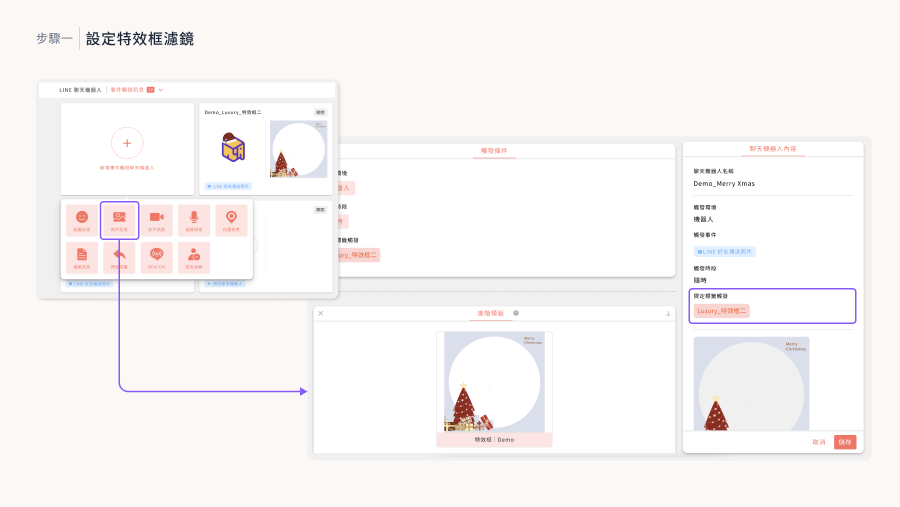
Step 1: Set up frame filters
The frame module works like this: whenever a LINE friend sends an image, the system automatically overlays your frame image on it and sends it back. All you need is a PNG with a transparent background, and you can easily add borders and decorations to your friends' photos, or even create a filter effect with a mask.
In this step, you can set up several frame modules, each with a different filter image, so friends can try out different frame filters and the campaign feels more polished. Once the modules are ready, add several "send image" chatbots under event-triggered chatbots, place each frame in its own chatbot, and assign each one a restricted tag. That way, friends can draw their own exclusive filter in the next step!
Step 2: Filter frame lucky draw
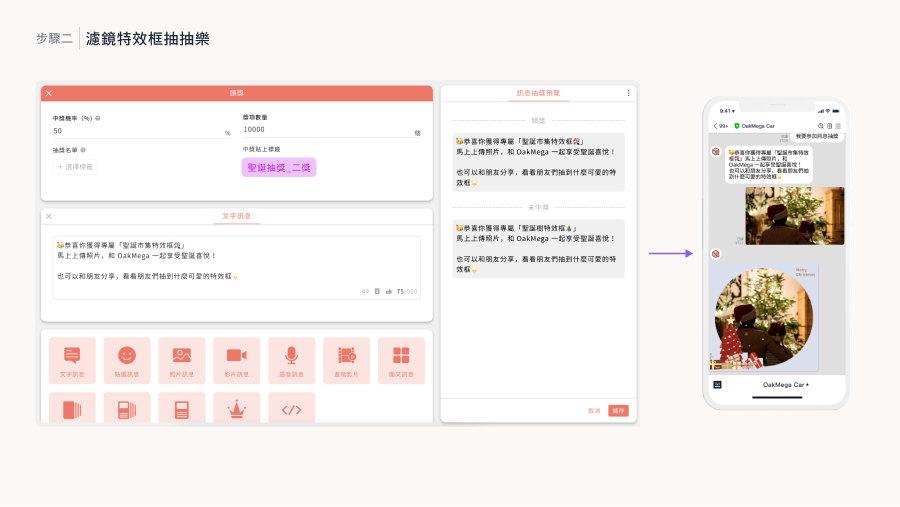
Next, set up a message lucky draw module so every participant can draw their own exclusive Christmas filter. When friends join the campaign together, each person can land a different filter, which gets people talking.
When setting up the lucky draw module, remember to configure the odds so that everyone wins, and tag each winner with the matching filter tag. Thanks to the restricted tags set up in Step 1, winners then get the filter they just drew whenever they send an image.
After the draw, use a text or rich message to prompt LINE friends to send an image, and the system will automatically send back the photo with the filter applied!
Step 3: Boost engagement with live polls
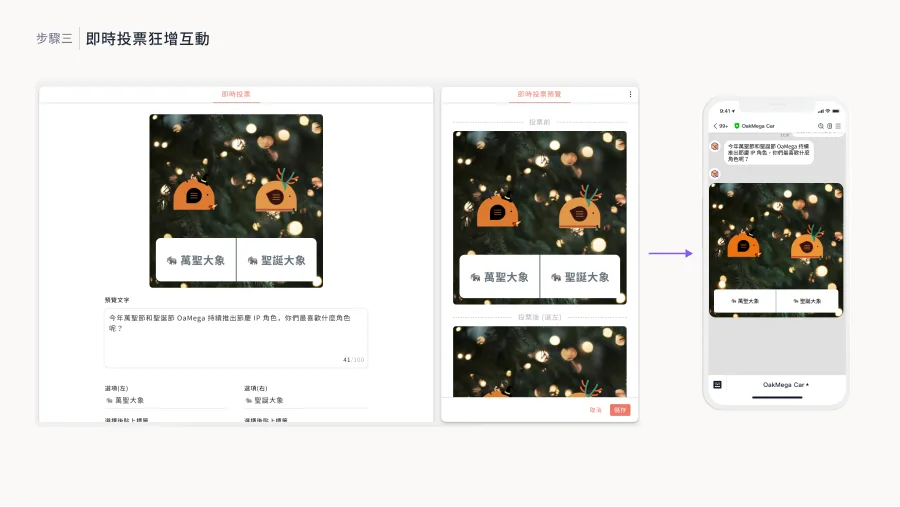
The final step is to add a live poll tied to the campaign, letting LINE friends vote for their favorite brand creative, filter, or mascot. What makes the live poll module fun is that votes are tallied in real time: every tap shows the latest vote breakdown sent back by the system. For most friends seeing a poll game like this on LINE for the first time, it's sure to be a novel experience!
Summary
That's a simple Christmas campaign built from three modules. If coming up with holiday campaigns always gives you a headache, you're a perfect fit for OakMega's 2023 "N-th Power Module Playbook | LINE Marketing Module Experience Session." We'll take you through the industry's widest range of 23 modules, so you'll never run out of fresh ideas again!
Sign up now: https://www.accupass.com/go/oakmega-marketplace