Double the Holiday Magic: Real-Time Interaction and Photo Filters on LINE
The holiday season is a pivotal moment for brands looking for fresh marketing ideas, and on a platform like LINE, creative, engaging campaigns matter more than ever. Today we take a deep dive into how to use three OakMega Social CRM modules to create Instagram-style filter effects and real-time voting on LINE, boosting user engagement and strengthening your brand image.
 Samuel JengHead of Product
The holiday season is a pivotal moment for brands looking for fresh marketing ideas, and on a platform like LINE, creative, engaging campaigns matter more than ever. Today we take a deep dive into how to use three OakMega Social CRM modules to create Instagram-style filter effects and real-time voting on LINE, boosting user engagement and strengthening your brand image.
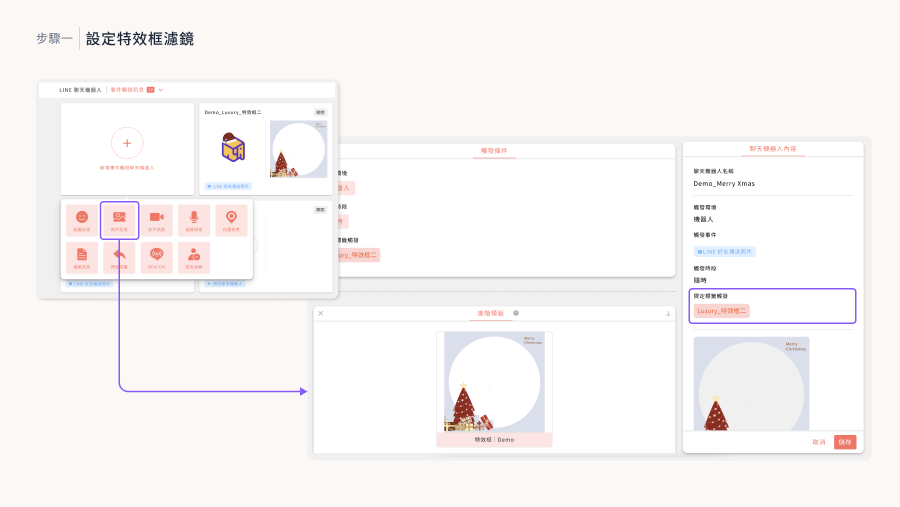
Step 1: Set Up Eye-Catching Photo Frame Filters
Start by configuring the photo frame module. Its core function: when a LINE friend sends an image, the system automatically applies a preset frame, creating a fun, distinctive visual effect. To make it work, simply upload a PNG with a transparent background as the frame, and you can add all kinds of borders and decorations to the images users send.
To add variety to your campaign, set up multiple frames in different styles and use the “Event-Triggered Chatbot” to place them in several “Image Received” chatbots. Users can then try out a range of frame filters, making the campaign more fun and engaging.
Step 2: Add Fun with a Frame Filter Lucky Draw
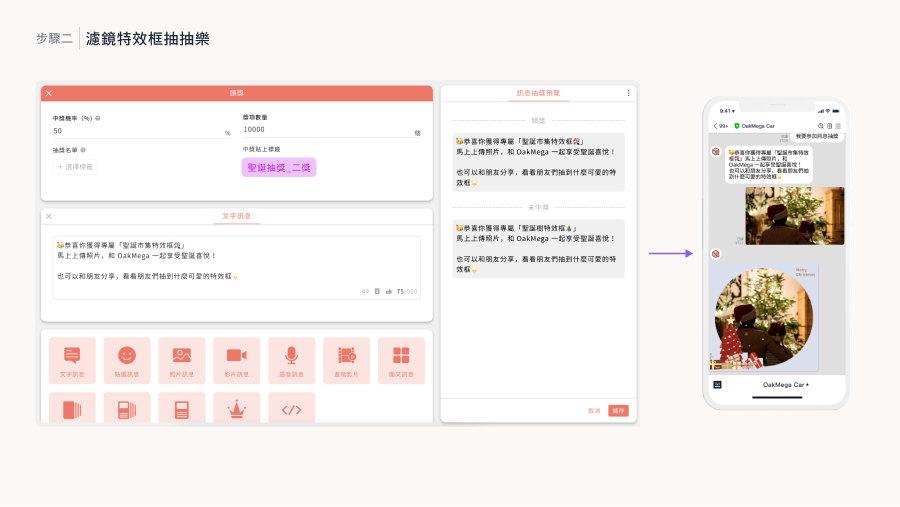
Next, set up a message lucky draw module. With it, participants can draw their own holiday-exclusive filter. Each user who joins the draw gets a chance to win a one-of-a-kind filter effect, which makes the campaign more interactive and sparks more conversation among users.
When configuring the draw, set the odds so every participant wins, and tag each winner accordingly. Then, when users send an image, the system automatically applies the filter that matches the tag they drew.
Step 3: Boost Interaction and Participation with Real-Time Voting
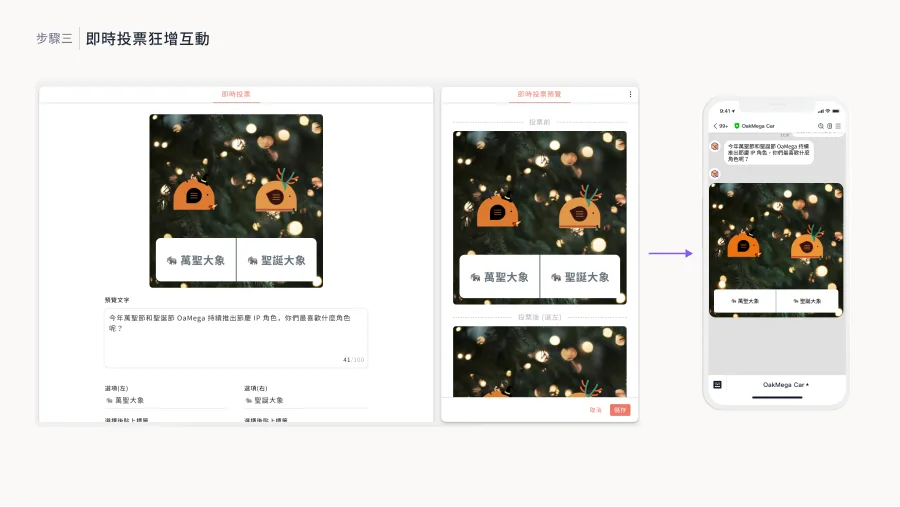
The final step is setting up the real-time voting module, an effective way to drive user participation and brand interaction. With it, users can vote for their favorite brand elements, such as promotional materials, filters, or mascots. The highlight: vote counts update in real time, and the system shows the latest vote breakdown after every vote. For many users trying this kind of voting game on LINE for the first time, that instant feedback makes for a fresh, exciting experience.
Conclusion
By combining these three modules, you can create a one-of-a-kind holiday campaign on LINE that deepens user engagement and boosts your brand's visibility and appeal. If you're looking for new marketing ideas, don't miss OakMega's carefully curated 2023 “N-th Power Module Playbook | LINE Marketing Module Experience Session,” where you'll learn how to use the industry's widest range of modules—23 in total—to level up your marketing campaigns.
Register now: https://www.accupass.com/go/oakmega-marketplace