LINE Official Account: Pro Tips for Managing Multiple Store Locations
Your brand has multiple locations, but how do you run them all from a single LINE Official Account? Most established chains keep just one official account because it's the best way to build followers and brand awareness. The hard part is managing customer service and sales for every location in that one account, and even tracking performance and KPIs by store.
 Samuel JengHead of Product

Your brand has multiple locations, but how do you run them all from a single LINE Official Account? Most established chains keep just one official account because it's the best way to build followers and brand awareness. The hard part is managing customer service and sales for every location in that one account, and even tracking performance and KPIs by store.
This article shows you the essentials of multi-location management on LINE, so you can run every store from one LINE Official Account with ease.
Simple Segmentation with Store-Specific QR Codes
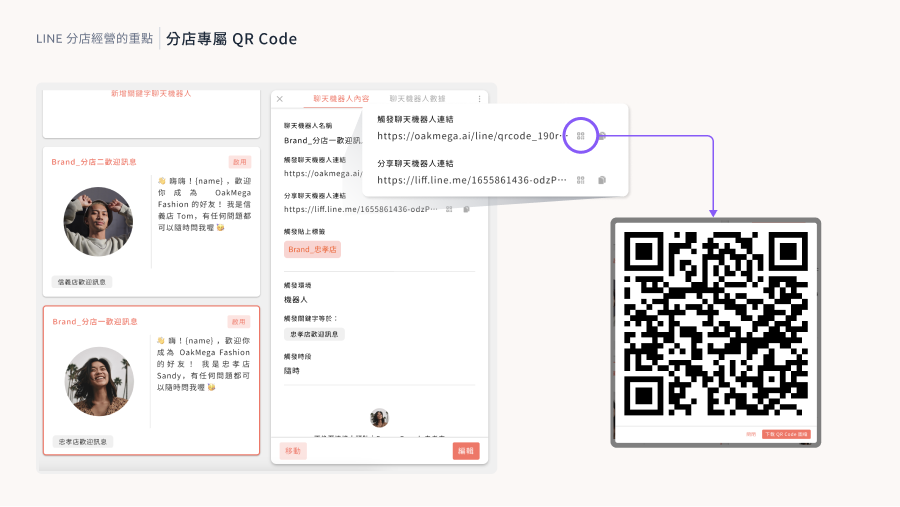
When running a LINE Official Account for multiple locations, you want to know which store each friend came from. Segmenting by store this way makes follow-up customer service and marketing broadcasts much easier. Place a store-specific “add friend” QR code at each counter, and you can tag every friend who scans it and confirm which store they joined through.
In OakMega Social CRM, every chatbot has a QR code trigger link: when a friend scans the QR code, it triggers that chatbot's messages. Using this, you can build a dedicated chatbot for each store and tag everyone who scans its QR code with that store's tag. You get basic tag-based segmentation, and with store-specific chatbot content you can welcome new friends in a more local, personalized way.
Build Loyalty with Segmented Rich Menus
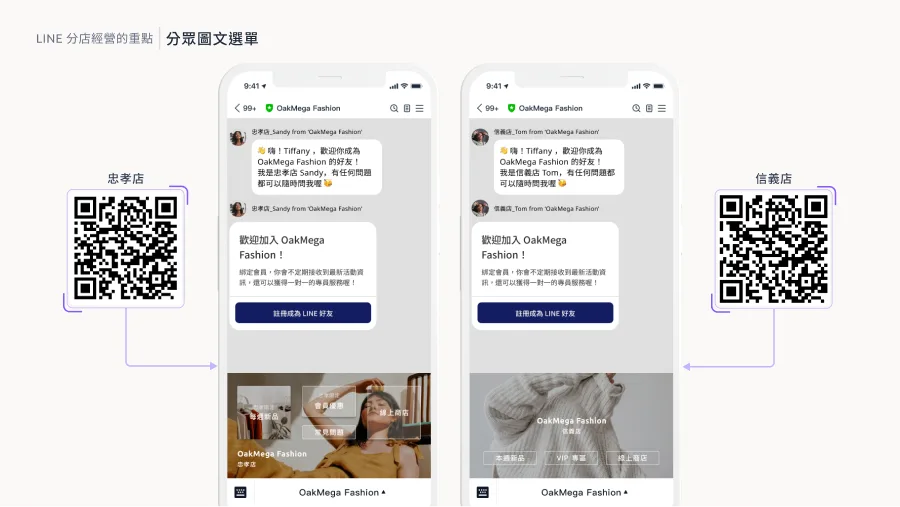
It's not only the brand that needs to see which store a friend belongs to in the dashboard. If friends can also see which store is serving them, their trust in that store and the brand rises sharply, and the connection on LINE feels more real. Segmented rich menus let you show different rich menus to friends of different stores. Keep the designs largely the same so every store retains the brand's key visuals, while customers can tell at a glance which store they belong to.
In OakMega, you can switch segmented rich menus directly inside a chatbot. The moment a friend scans a store's QR code, their rich menu changes to that store's menu. This seamless, no-extra-steps experience cuts work for both friends and store staff, and satisfaction climbs on both sides.
Add Warmth with Persona Avatars
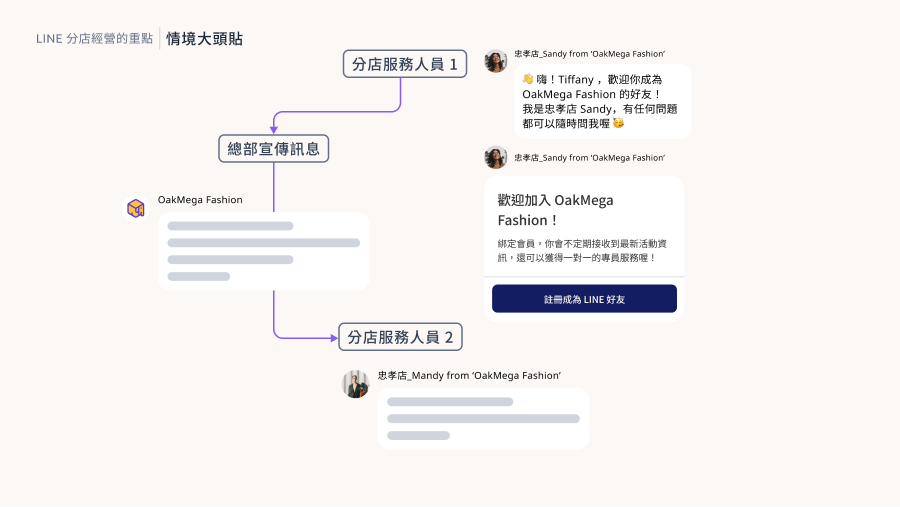
Persona avatars act as roles, or masks, for your official account. When talking with friends, you can use them to show whether a message comes from “store staff” or is a “headquarters promotion.” Friends can easily tell message types apart, so not every message feels like an ad, and they know a real person is behind the conversation.
Going further, if your stores have several sales or customer service staff, each handling their own customers, we strongly recommend creating a persona avatar for every staff member. It conveys the sincerity and warmth of real human service, and friends always feel they're being served by one dedicated person.
Optimize Customer Service with Service Center
Building on the previous scenario, if every store has several sales or customer service staff, we highly recommend using OakMega's Service Center as the main customer service platform for your LINE Official Account. Here are three key Service Center features:
- Automatic assignment: Set assignment rules in OakMega Service Center to route messages from each store to that store's staff. The real-time, fully automated system means you never have to worry about routing store messages again, and it works for store and service teams from 10 to 1,000 people.
- Fully automatic persona avatars: With OakMega Service Center, you can turn on fully automatic persona avatars so every store staff member has their own avatar, with no one-by-one setup. One official account becomes the personal account of 100 store staff, making conversations far warmer while keeping the credibility of your brand's official account.
- Manager and agent roles: OakMega Service Center has two roles, manager and agent. The agent role suits store staff and customer service agents: they automatically receive assigned messages and can't see conversations handled by others, fully protecting privacy. The manager role makes it easy to track results, manage all messages, and step into the service process to help at any time.
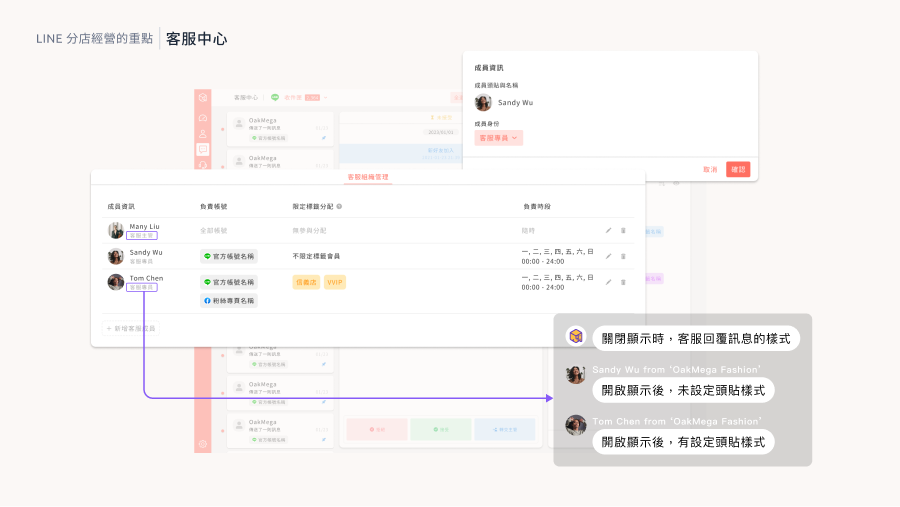
For more on Service Center features, see the OakMega Service Center page on our website.
Conclusion
Running store locations takes many advanced LINE features. Want more tips and tools for store operations? Don't miss our major year-end 2023 event, “Module Power Strategies | LINE Marketing Module Experience Session.” We'll reveal OakMega's 23 modules, the most in the industry, and walk you through 10 hands-on scenarios. Registration is free, so sign up now!
Sign up now: https://www.accupass.com/go/oakmega-marketplace