How to Create and Share Attention-Grabbing Special Messages on LINE
Is your official account still sending plain images and text? If you want to create stunning full-width visuals or swipeable multi-page messages, this tutorial is a must-read. Double your click-through rate!
 Samuel JengHead of Product
Multi-Panel Rich Messages
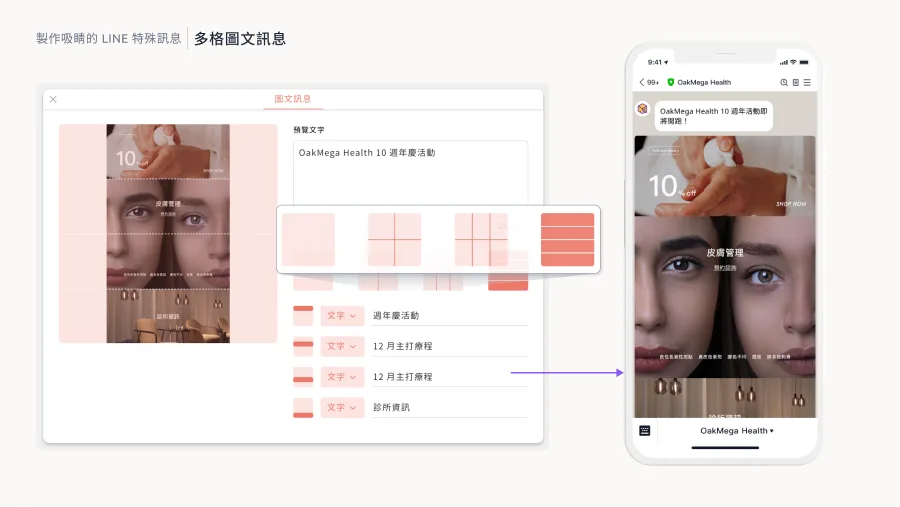
LINE rich messages are arguably the most versatile, feature-packed message format for official accounts. They display images edge to edge and let you embed links friends can tap directly, making them the most effective way to boost conversion rates.
In the native LINE OA dashboard, rich messages come in a few fixed templates and require square images. They're quick to set up, but they limit your creativity.
Beyond the native option, OakMega's multi-panel rich messages let you upload images in whatever aspect ratio you want and freely use up to 144 clickable link areas. With simple drag and drop, you can build highly functional multi-panel rich messages.
Multi-Page Messages
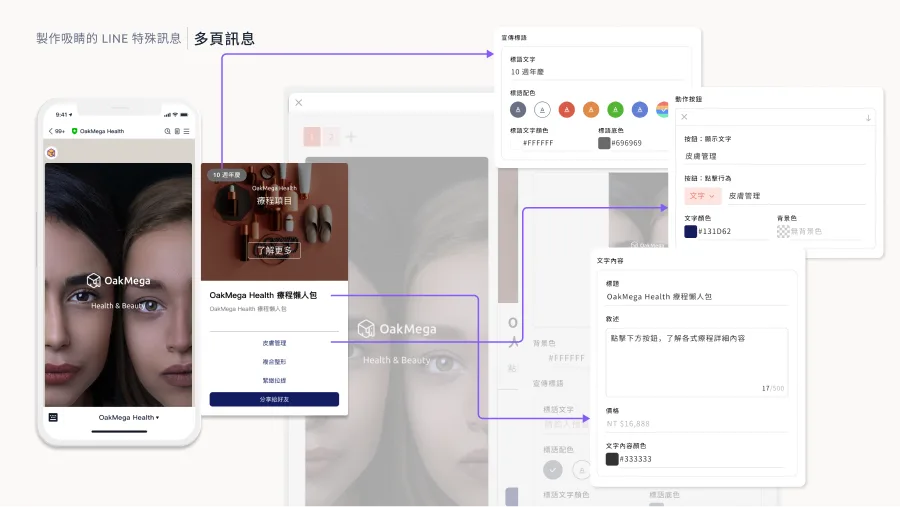
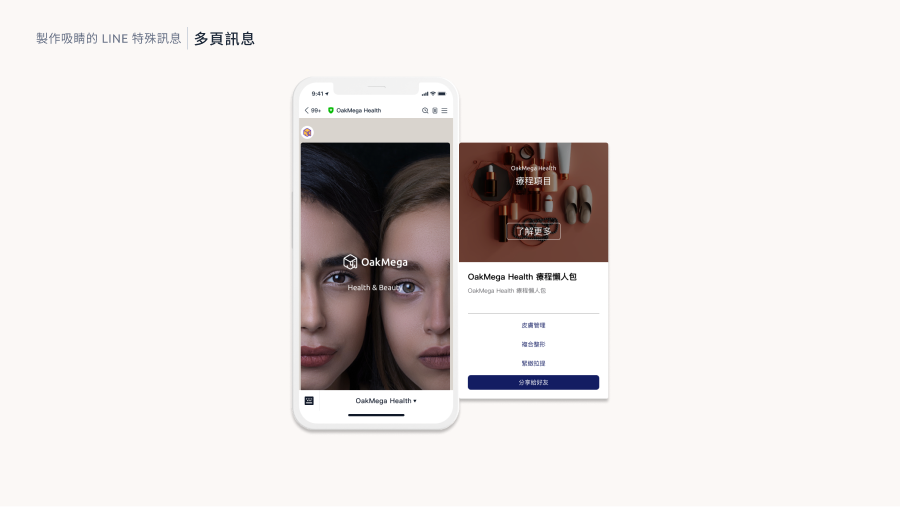
Besides rich messages, LINE offers multi-page messages: several small pages that friends swipe through, such as information on multiple products or step-by-step instructions, so they can browse freely and find what interests them.
The native LINE OA dashboard also supports a multi-page message format. You can upload images, add text, and set the action each button triggers, with 6 colors to choose from for basic visual styling.
OakMega's multi-page messages do more. On top of the native features, you can set different ratios and sizes, the pages don't all need identical content, and auto-layout means you don't have to worry about broken layouts. OakMega's multi-page messages are also the industry's first with fully adjustable colors: you can edit the color of every button and tagline individually, so your messages match your brand palette and create a truly unique brand identity.
Share Module
Even with all these special message formats, it's a shame if friends never share them! New friends who join a LINE Official Account can't see earlier messages, and special-format messages can't be shared directly like images. So many friends either don't share at all or share a screenshot, which largely defeats the purpose of the special format.
OakMega's share module gives friends a way to share these special messages. Set up the OakMega share module and friends can share special-format messages with their buttons intact, directly expanding your official account's reach and making sure everyone who receives them remembers your brand and message.
Wrap-Up
Want to create messages that make your friends' eyes light up? Learn more ways to use special formats and how to set up the share module at “Module Power Strategies | LINE Marketing Module Experience Session” on December 20, 2023. We'll walk you through the 23 modules OakMega offers so you can unlock LINE's full potential!
Sign up now: https://www.accupass.com/go/oakmega-marketplace