Understand How Your Friends Use LINE: Build a Chat Community Tailored to Your Users
When a LINE or Telegram chat community turns into one-way broadcasts, it becomes nothing more than a business pushing ads at users. Social platforms and ad platforms alike are working hard to serve personalized content, so a chat community can't just push the same message to everyone. The first question to ask: in what situations do users interact with you through your LINE Official Account?
 ILING WuProduct Marketing Manager


In LINE's early days, brands drew consumers to their official accounts with free stickers, lucky draws and reward points. Plenty of official accounts built followings of millions or even tens of millions, but sky-high block rates are a problem most of them now face.

When a LINE or Telegram chat community turns into one-way broadcasts, it becomes nothing more than a business pushing ads at users. Social platforms and ad platforms alike are working hard to serve personalized content, so a chat community can't just push the same message to every user.
The first question to ask: in what situations do users interact with you through your LINE Official Account?
Step 1: Define your target audience
“Our audience is likely 25–35, passionate about the brand, and wants the most useful information.”
Once you've defined your audience, map out their usage scenarios. The same user may behave differently in different situations and need different information at different moments. When someone adds your LINE Official Account, there is always a reason: “I want to hear about the brand's promotions,” “I want to grab a spot as soon as registration opens,” or “I want to keep up with what the brand is doing.”
Step 2: Categorize usage scenarios
The book Designing Around You describes a method that sorts scenarios into three broad types: common scenarios, essential scenarios and edge scenarios.
Common scenarios
Common scenarios are the interactions you run into most often, such as the purchase process, customer service, payment details and product pricing. These are the main situations in which users engage with your LINE Official Account. Whenever a new frequently asked question comes up, it becomes another common scenario, which makes your account feel more human.
Essential scenarios
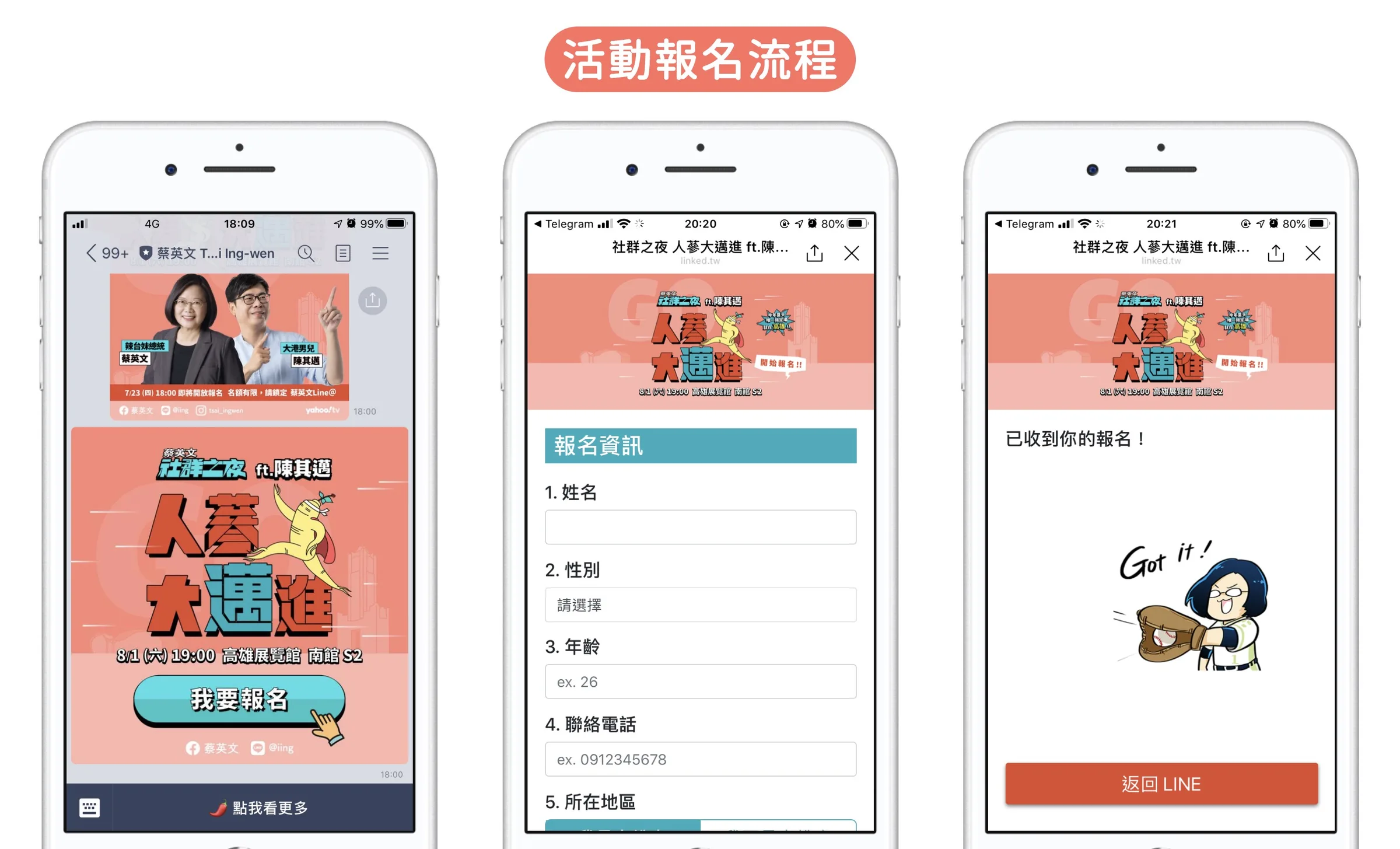
Essential scenarios are the ones that require LINE, such as linking a membership card when adding the account, LINE-exclusive offers and signing up for events through LINE. Exclusive information that users can only get in the chat community makes them stick with your account. It also tests how smooth the whole flow is: the fewer steps, the more easily users get things done.
Edge scenarios
These are the more extreme cases, such as when the bot can't match any keyword. Here you can design a flow that hands off to a human agent, asks the user to leave their details, or guides them to tap a preset keyword.
Scenario planning exists to solve problems
Anticipating each user's scenario is really about solving problems, and you can approach different scenarios in many ways.
Take one of our clients: their products sold mainly through offline retail channels, but they had no visibility into who their customers were at each channel. They wanted to use LINE to bring that information together and overcome the channels' inability to collect member data.
What every offline channel has in common is the receipt: every purchase comes with an invoice. Customers can upload their receipts directly through LINE and then enter a draw for LINE Points. This boosts customers' willingness to upload receipts and gives the client the customer insight it wanted.
Conclusion
In Taiwan, it's hard to find anyone whose phone doesn't have LINE. Everyone uses it. A chat community is the most direct way to talk to users, but because it's relatively private, it's also the hardest to run. Think about how you normally talk to your friends.
When you meet someone new, do you talk about shared interests or about something completely unrelated? And how would it feel if more than 50% of your friends blocked you?
Stop treating your chat community as an ad platform. Try to understand users' preferences through real conversation, and you'll have more effective exchanges while cutting your block rate dramatically.

📣 Join the Telegram Taiwan Marketing Lab and join the discussion
OakMega Social CRM, the LINE CRM built for marketers: https://oakmega.com/
Official website / Facebook page