Blog

Telegram 101: How to Build a Brand Community on Telegram

There are three ways to run a community on Telegram: Channels, Groups, and Bots. The quickest way to understand a channel is to think of it as a bulletin board. Of the three, channels are the best place to push messages and publish posts, given the features Telegram offers.

An introduction to building a community on Telegram
The Telegram logo in the background with the headline “How can it be used to build a community?” in the center, introducing the article's topic.

Last time, we called Telegram the rising star of conversational commerce, and more and more brands have been moving onto it. This article offers a first look at how brands can use Telegram:

(1) Use cases for Telegram Channels, Bots, and Groups
(2) A brand's first step into Telegram
(3) How Telegram's setup compares with other messaging apps for push messages

There are three ways to run a community on Telegram: Channels, Groups, and Bots.

Don't rush to pick one just yet. You'll have a clearer sense of direction once you've read the whole article, and we'll follow up with detailed tutorials on how to create and run each one.

(1) Channels

The quickest way to understand a channel is to think of it as a bulletin board. Given the features Telegram offers, channels are the best place among channels, bots, and groups to push messages and publish posts. You can send messages to your subscribers*, but subscribers can't interact with the channel in any way. Think of it as a Facebook Page with no likes, comments, or shares, where all you can do is post.

* Subscribers:
1. The audience that has joined the channel.
2. Each time a subscriber opens a message, the view count goes up by 1 (in other words, reach).
3. Subscribers can also mute notifications, leave the channel, or report it.

⭐️Because leaving a channel takes more steps, user behavior shows that most subscribers mute notifications rather than leave;     

Judging by the numbers alone, channels rarely lose their audience.

‍

For one-to-one push messages to users, we compared the push messaging limits of each messaging app:
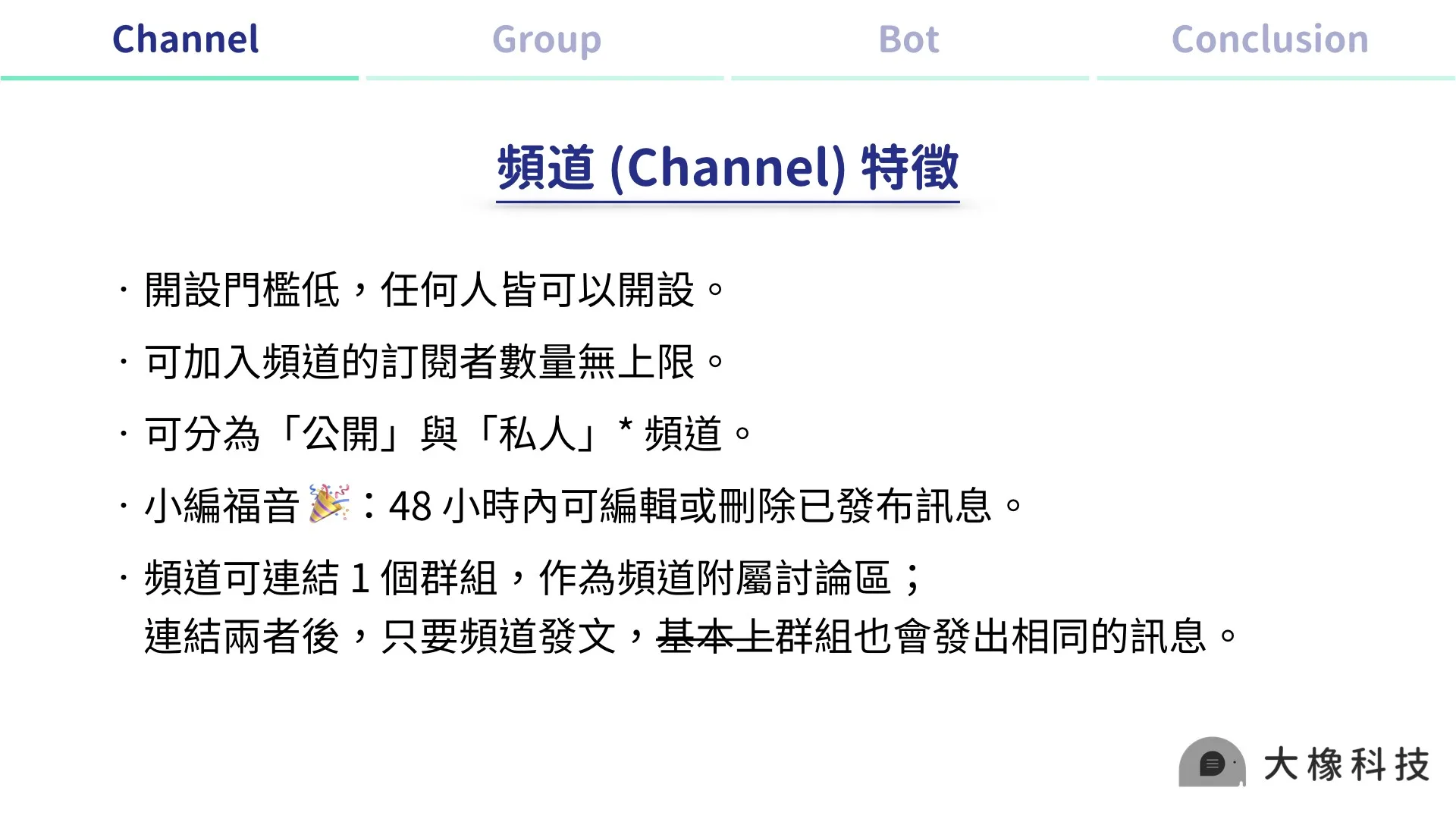
Slide on Telegram channel features: setup requirements, subscriber count, public or private settings, message editing, and linking a discussion group.

⛔️ We say “basically” because in our repeated tests, a channel post sometimes failed to go out to the linked group at the same time. When that happens, you can post manually to work around this small bug.

Channels
1. Public: can be found in search and joined directly; anyone can invite members without admin approval.
2. Private: can't be found in search; people join via a link and need admin approval.

‍

Telegram channels can also connect to third-party bots, which add interactive post formats.

Connecting them is fairly complex, and the method varies by service, so we'll share connection tutorials for a range of third-party services in the future!
For now, our advice: just open a channel and get familiar with how Telegram communities work.

‍

(2) Groups

If you've ever joined or run a LINE group, you already understand the basics of a Telegram group.

For community management, the biggest difference between groups and channels is that when you post in a group, you can't see your reach.

In a group, any member can invite others, and a single group can hold up to 200,000 people. Because groups are where people chat and discuss, we recommend focusing on quality over quantity; too many people makes a group hard to manage.

Here are the key features of groups:
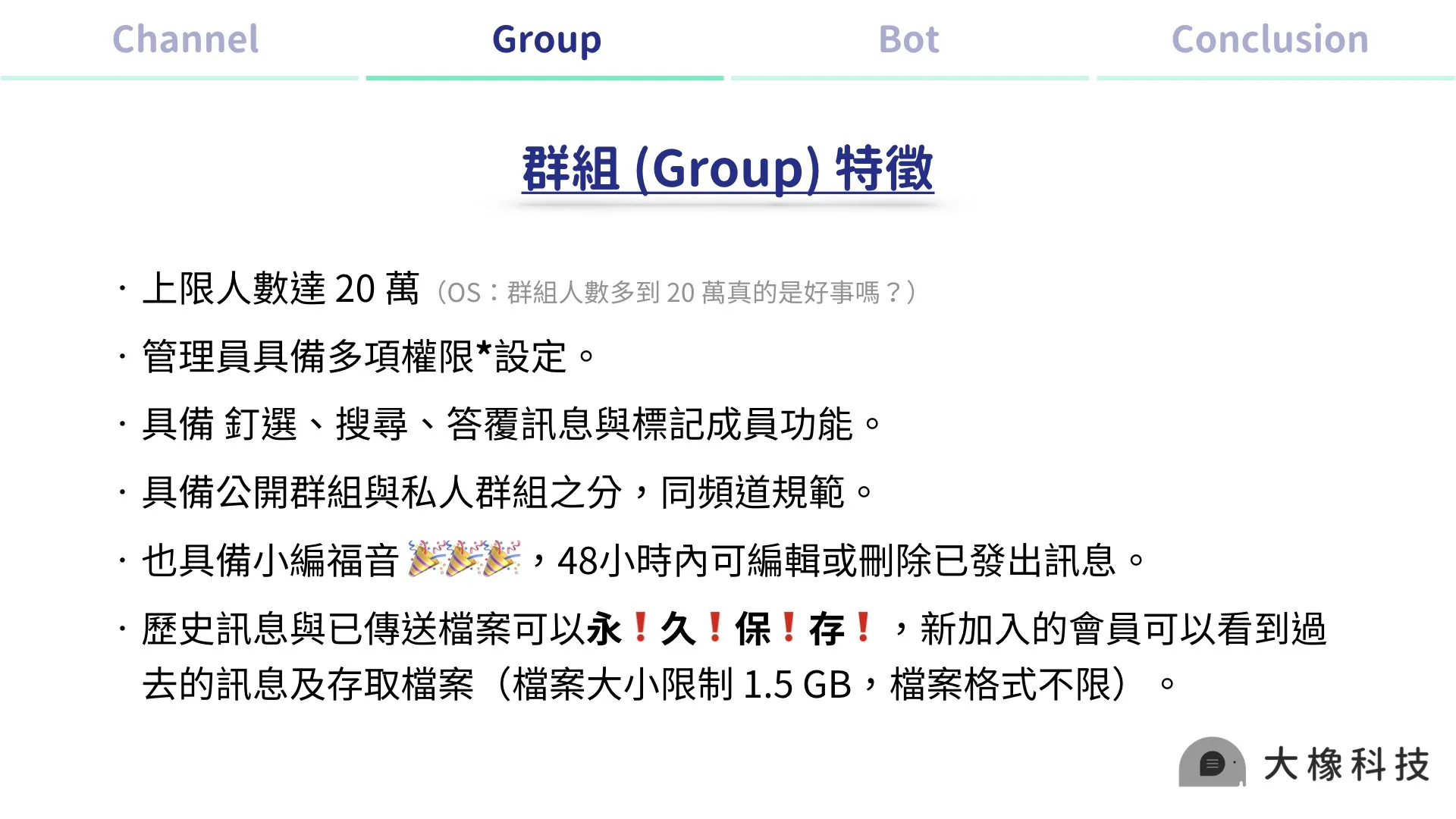
Infographic of Telegram group features: member limit, admin permissions, polls and search, group types, and message editing and saving.

‍

Telegram group admin permissions:
1. The group creator can decide whether new members see the chat history
2. The group creator can set slow mode (e.g., one message per minute, so the group isn't flooded)
3. The group creator can restrict whether admins can:    
send messages/files/stickers and GIFs/create polls/add new members/pin messages/change group info
4. Each restriction can be set separately, so you can give admins different permissions and let each one handle their own role.

‍

(3) Bots

Bots on Telegram are built around functionality. They can add interactive formats and automated push messages to your channel posts, among other special features. Bots can also run games, help you search for stickers, and offer other utilities.

Many Telegram marketing articles outside Taiwan describe bots as Telegram's super-app. Put simply, almost anything an app can do, a Telegram bot can do something similar.

Because Telegram is largely open source and its open API is more flexible than LINE's, engineers have long been building bots with all kinds of features. These bots can join channels and groups and act as assistants for running a brand.

But!

Bots' versatility is both their biggest strength and their biggest weakness. When running a brand, I can certainly find a bot for the function I need, but since bots come from different developers and work in different ways, a string of problems follows:
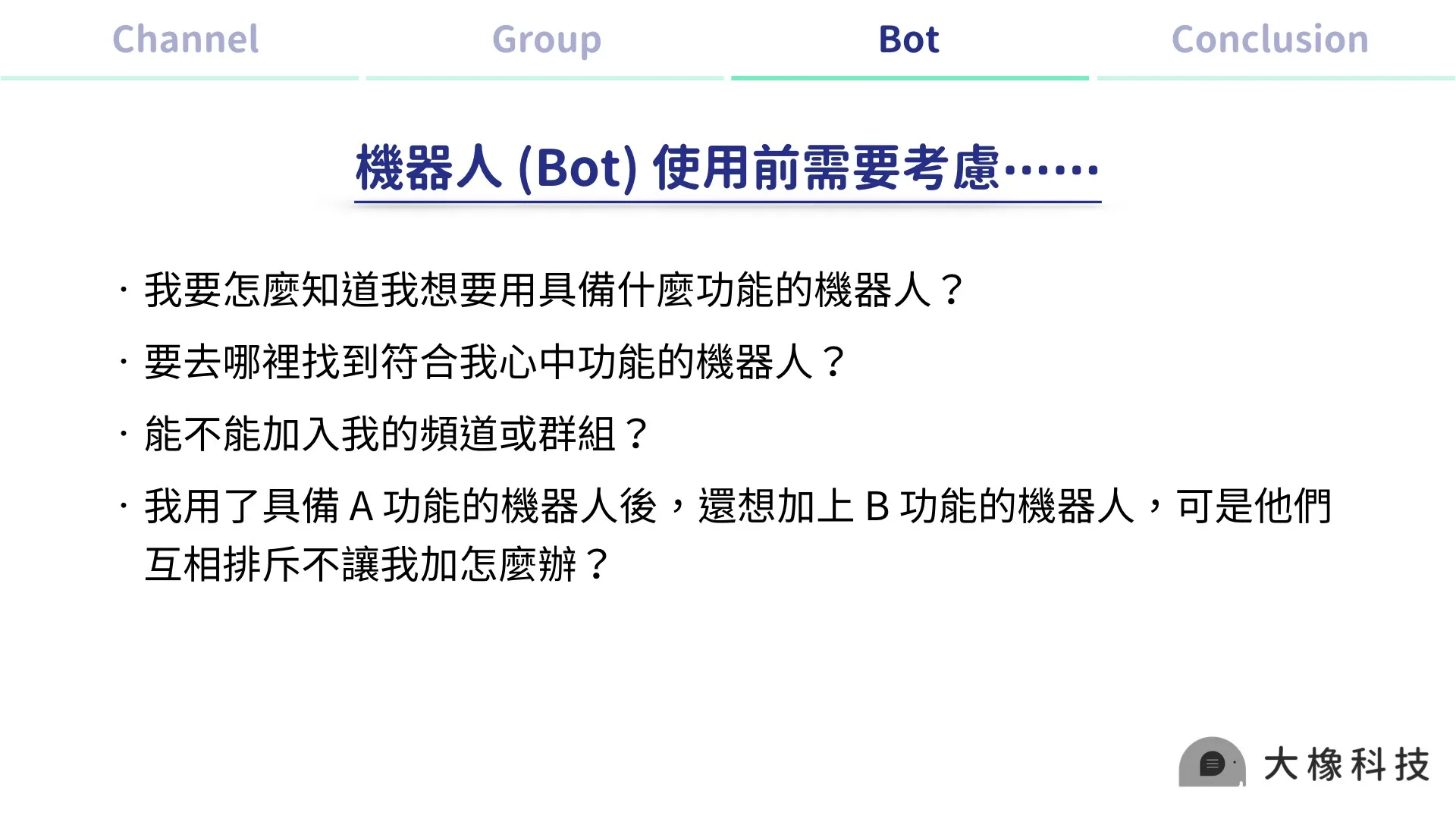
Slide listing what to check before using a Telegram bot: features, how to find it, whether it can join channels or groups, and compatibility.

Bots are the most direct helpers for running brand channels and groups, but they come with more uncertainty, which turns into a hidden cost of community management!
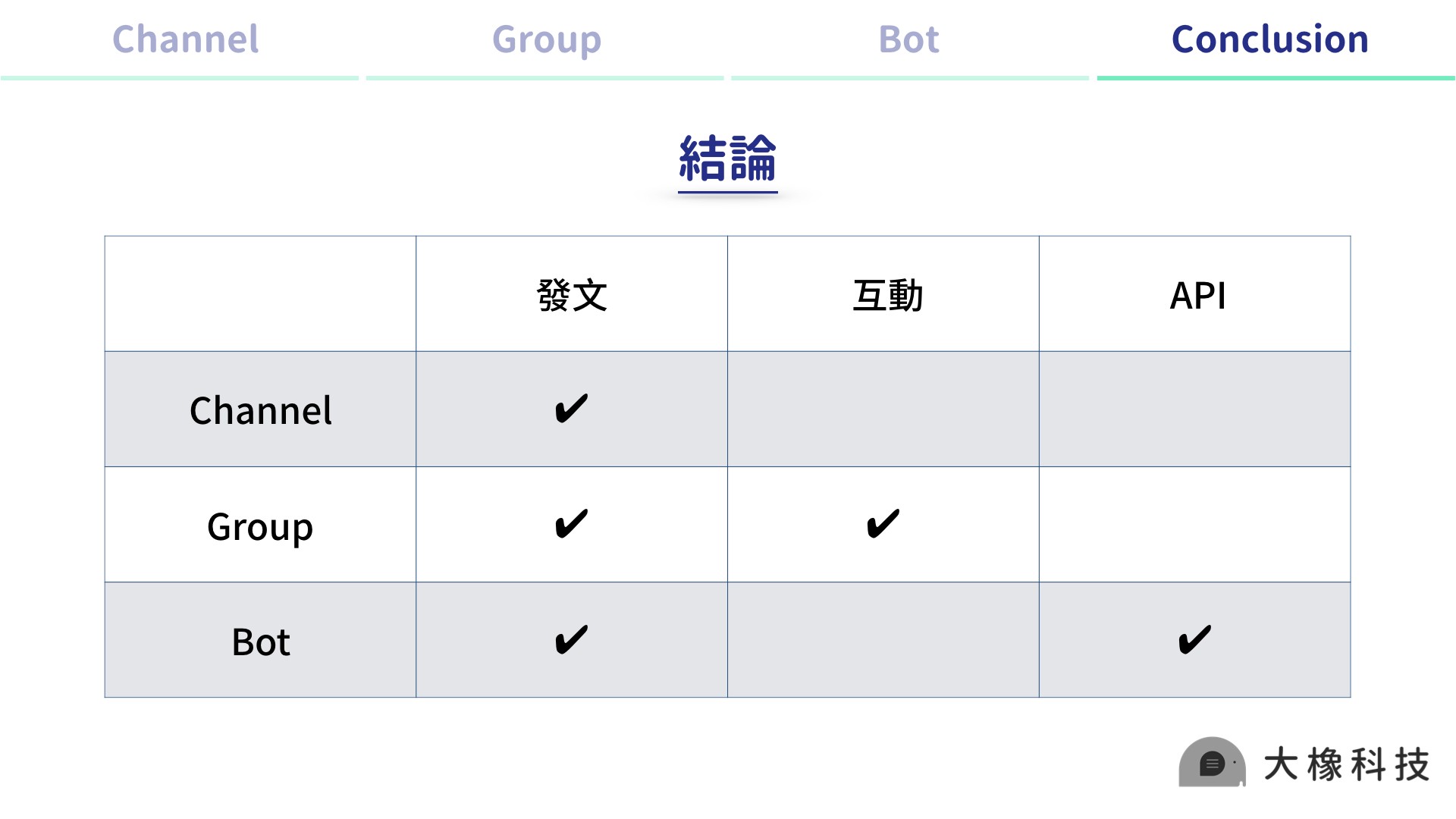
Summary table comparing channels, groups, and bots: all three can post, groups allow interaction, and bots support APIs.
Note: Once a bot is connected to an API, adding it to a channel or group gives that channel or group the same connected features.

That's a quick introduction to the three things every brand needs to know on Telegram: Channels, Groups, and Bots. If this cleared things up, give us a clap!

Next time, we'll show you how to create a Channel, Bot, and Group.

📣 Join the Telegram Taiwan Marketing Lab and talk shop with everyone

🛩 Rest your eyes: listen to our podcast and get up to speed on Telegram trends in a few minutes   

⏩ Spotify : https://reurl.cc/e50q8b
⏩ Apple : https://reurl.cc/4gkEmv
⏩ TuneIn : https://reurl.cc/qD9y8E

‍

You might also like

Hitting 80% attendance at a free offline event with a chat community
2020-10-21

How We Hit 80% Attendance at a Free Offline Event with a Chat Community

2020 TeleLens DemoDay is a wrap! Thank you all for joining. With rain that day, we were worried about turnout for a free event, but the final check-in rate was 83%. Since it was TeleLens DemoDay, we had to show what Telegram can do, so online registration, on-site check-in, and in-event games all ran on a Telegram bot. So what did we actually do?

ILING WuProduct Marketing Manager
Telegram's love-hate relationship with governments
2020-05-25

Telegram the Chameleon: Is Cybersecurity National Security? Telegram's Love-Hate Relationship with Governments

Telegram promises the highest level of confidentiality for user data and has refused to hand chat records over to several governments. That promise fueled its rapid global growth: it reached 400 million monthly active users in just six years. Interestingly, in Taiwan, brands moved to Telegram before users did because LINE raised its prices, which had nothing to do with security or privacy. In Taiwan, Telegram has become one more option for running communities across platforms.

AbbieCustomer Success Manager
KOLs and influencers building a fan community on LINE
2020-09-15

How Can KOLs and Influencers Build Their Most Loyal Fan Community on LINE?

YouTube is gradually becoming mainstream media, yet creators still have many platforms to manage, from Facebook Pages and Instagram to YouTube memberships, Twitter, and livestreaming platforms. Content structure is still what matters most in KOL marketing: it strengthens your fan base while letting you promote brand partners’ products to your audience, turning personal brand value into commercial value that drives traffic and lifts conversions.

ILING WuProduct Marketing Manager
Contact us

Start your AI transformation today.

They chose OakMega