How to Build LINE Forms: Enterprise Thinking, User Experience, and Case Studies
Forms do more than collect data. They are a valuable business asset: direct purchase conversions, audience profiling, and even the data that shapes better products all depend on the first-party data your forms capture.
 Tia WangBrand Marketing Manager

Forms do more than collect data. They are a valuable business asset: direct purchase conversions, audience profiling, and even the data that shapes better products all depend on the “first-party data” your forms capture.
That’s why CRM College developed the “4-6 Principle,” which pairs four enterprise mindsets with six experience essentials to help brands optimize sign-up, registration, customer service, and inquiry forms, and connect them with LINE to build automated member journeys. This article distills the highlights of our seminar and walks through three case studies to show how the right form becomes the starting point of enterprise-grade customer relationship management (CRM).
Contents
- What Is “Enterprise-Grade” Form Design Thinking?
- CRM Form Design Guide: The “4-6 Principle”
- Why LINE Forms? What Are the Benefits?
- Member Sign-Up: Turn One Form into Repeat Customers
- Event Registration: Digitize Four Stages for Security and Efficiency
- Customer Inquiries: Three Must-Have Techniques for CRM Forms
👉 Download the OakMega Forms Deck
What Is “Enterprise-Grade” Form Design Thinking?
Feel like your Google and Meta ad performance keeps slipping? With privacy regulations in force, third-party customer behavior data has dropped by 80% ¹. Businesses that don’t want to break the law by buying contact lists, yet still need to reach the right customers, have to find another way.
The good news: research from Google and BCG found that companies collecting first-party data through forms achieved up to 2.9x revenue uplift and 1.5x cost savings ². The reason is simple: better lead quality means steadier conversion from opportunity to purchase.
Forms are no longer just a handful of fields; they are the new battleground for customer acquisition. Most form tools on the market are more than enough for wedding RSVPs or birthday parties, but they fall short of enterprise needs. A typical form collects data once. Enterprise-grade thinking turns form data into a long-term asset, and that is a fundamentally different goal.
CRM Form Design Guide: The “4-6 Principle”
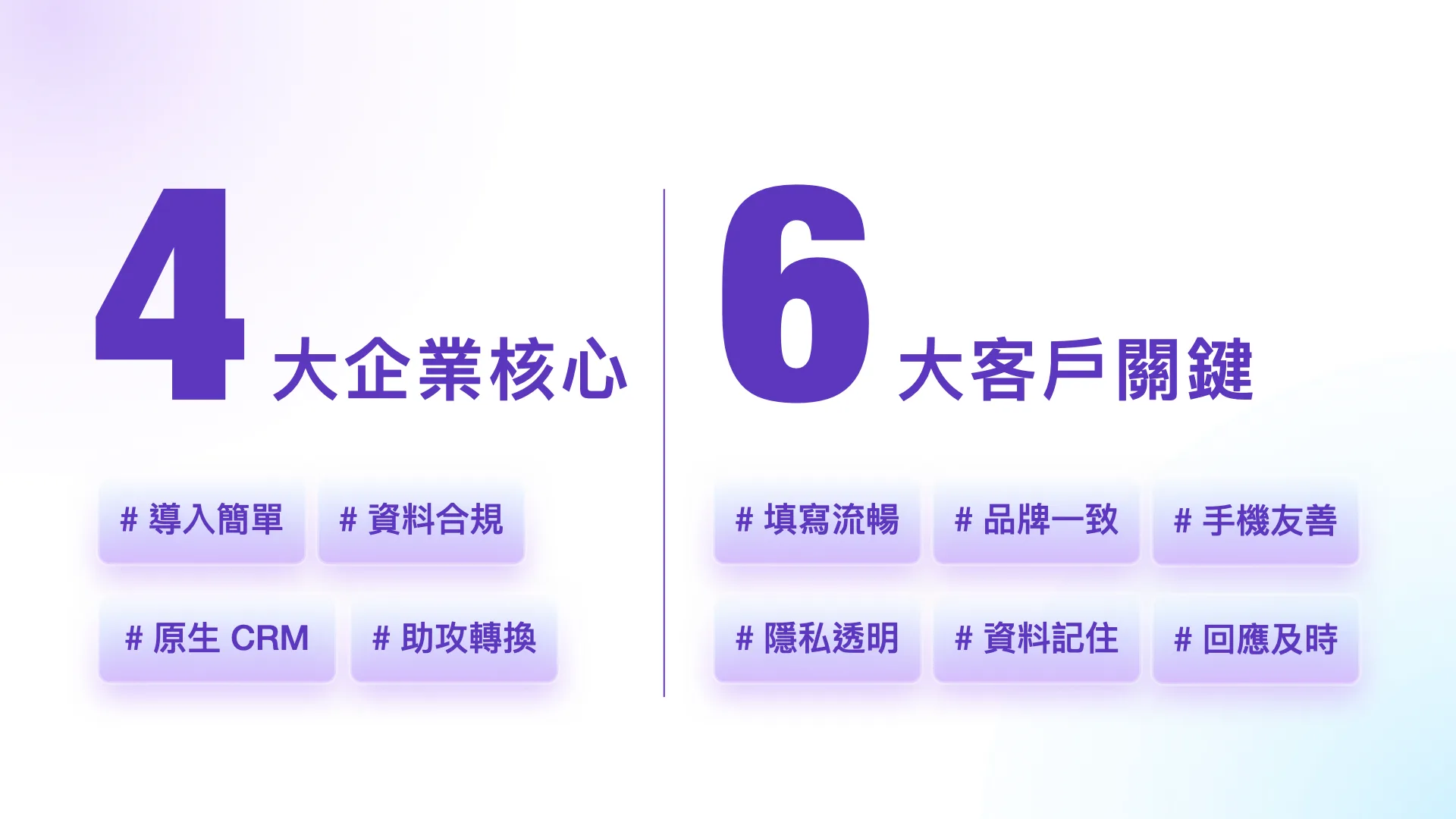
4 Essentials for Choosing an Enterprise Form Tool
Forms have evolved from data collection tools into revenue drivers. When choosing a tool, businesses should focus on four essentials:
- Easy adoption: 70% of digital transformations fail because systems are too hard to use ³. A tool anyone can pick up quickly is the real key to successful adoption.
- Data compliance: the average data breach costs US$4.44 million ⁴. Forms with built-in GDPR and PDPA compliance reduce that risk.
- Native CRM: more than 70% of leads sit idle ⁵. CRM integration enables instant segmentation and follow-up, keeping sunk costs from piling up.
- Conversion support: fail to respond within 5 minutes and the lead is gone⁶. Forms need automated notifications and messaging to seize the golden window for closing.
6 Design Essentials for High-Performing Forms
Even with the right tool, a poor form experience will cap your conversion rate. These six details are the most often overlooked:
- Smooth completion: Hick’s Law states that more options mean slower decisions. Use pagination, skip logic, and pre-filled fields to lower cognitive load.
- Brand consistency: Consistent colors, logos, and fonts reduce perceived risk and make users more willing to fill out the form.
- Mobile-friendly: 61% of users abandon because of a poor mobile experience ⁷. Text and images must fit every device to avoid drop-off.
- Privacy transparency: With third-party cookies phased out ⁸, whether users share personal data depends on how transparent you are about where it goes.
- Remembered data: Social logins such as LINE Login spare users from retyping, so the form “remembers” them.
- Timely response: replying within 5 minutes can lift conversion 21x⁹. Reach out instantly through a specialist or LINE to keep users engaged.
⇩ Seminar Highlights | 6 Common Form Design Mistakes, Explained in 8 Minutes
Why LINE Forms? What Are the Benefits?
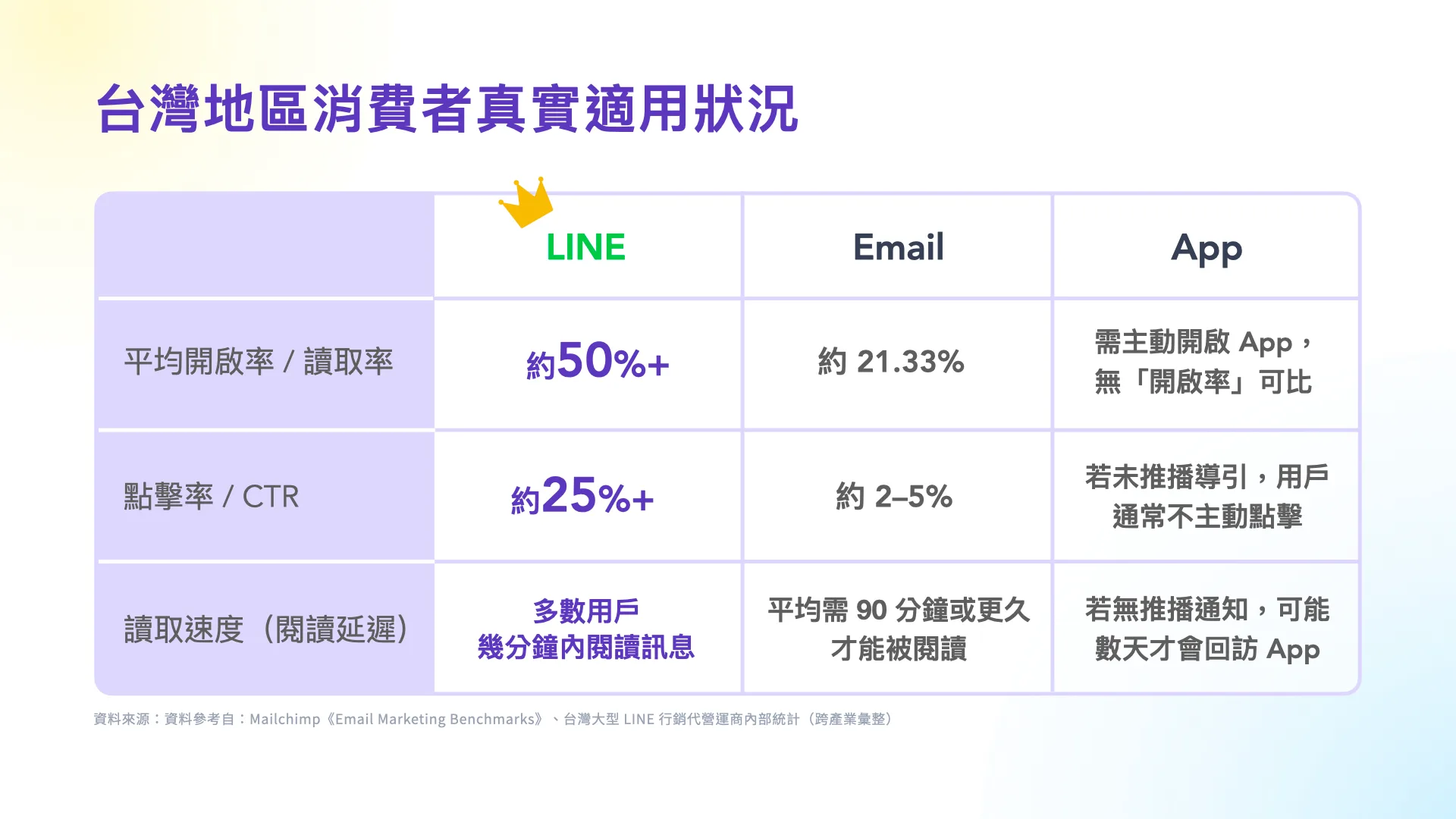
With segmented messaging, LINE’s average open rate often exceeds 50%, and its click-through rate and read speed are significantly better than email and apps. If your forms connect to LINE, you not only reach people more efficiently but also turn interactions directly into business opportunities.
That’s why we strongly recommend form tools that integrate deeply with LINE. Take OakMega Forms: it fully supports social login, lets users start a conversation right inside LINE, and syncs data to your CRM in real time to carry the customer journey forward.
👉 Download the OakMega Forms Deck
Next, we’ll use OakMega Forms to walk through three common enterprise scenarios, sign-up, registration, and inquiry, and break down the design points that help you build an efficient CRM journey.
Member Sign-Up: Turn One Form into Repeat Customers
Websites and apps are common entry points for member sign-ups, but users usually return only when they need something. Even ad-driven traffic is hampered by unstable algorithms and rising costs, trapping brands in a cycle where “no ads means no traffic.”
By contrast, LINE has a 93% penetration rate in Taiwan, with average daily usage of more than an hour. Making your brand’s LINE OA the sign-up entry point fits naturally into users’ daily routines and turns one-off traffic into “customer assets you can nurture over time.”
6 Key Details in Form Design
Using Singapore Airlines as an example, here are six sign-up details and how they connect to automation.
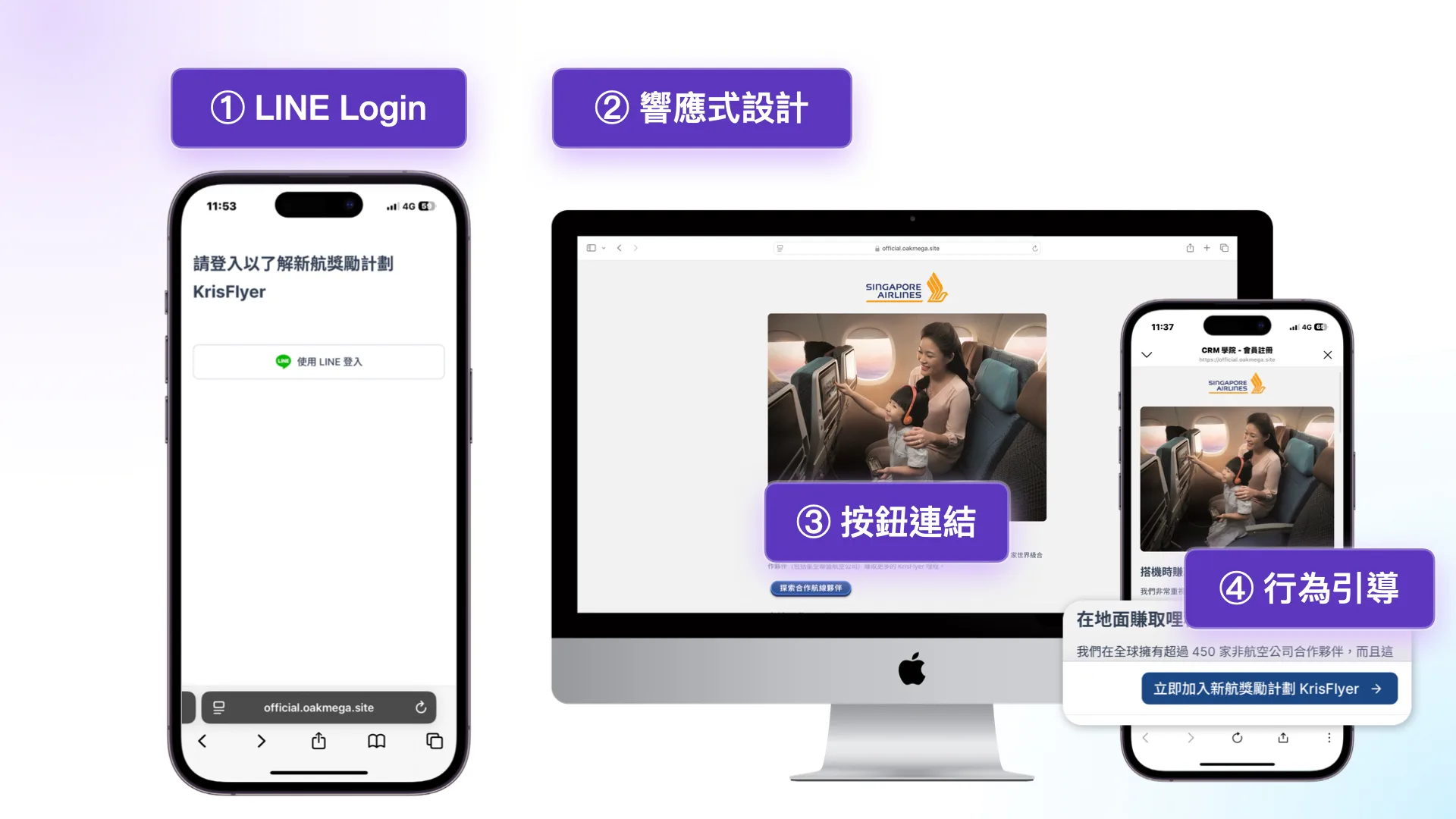
① LINE Login: Social login auto-fills existing data and reduces friction.
② Responsive (RWD) design: The layout adjusts automatically for a smooth experience on every device.
③ Button links: On-brand CTAs, with external links opening in a new tab so form completion isn’t interrupted.
④ Behavioral prompts: A persistent “Sign Up Now” button keeps guiding users back to the core action.
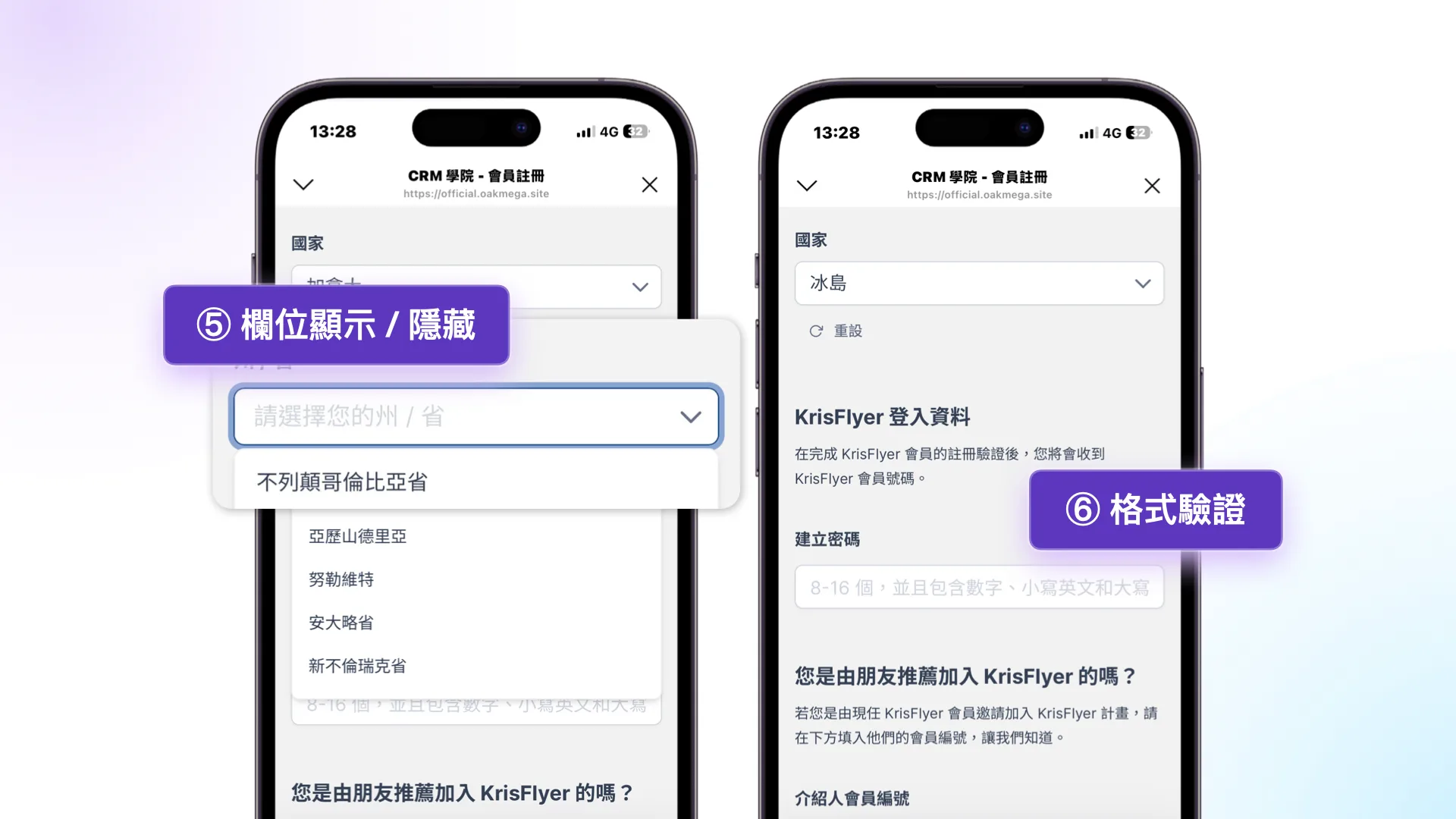
⑤ Show/hide fields: Questions appear or disappear based on answers, so users see only the fields relevant to them.
⑥ Format validation: Regex checks keep users from submitting invalid data and reduce manual review.
3 Automated Paths to Build Customer Relationships
The moment a user completes an action is the best time to engage. Automation can guide them straight to the next conversion.
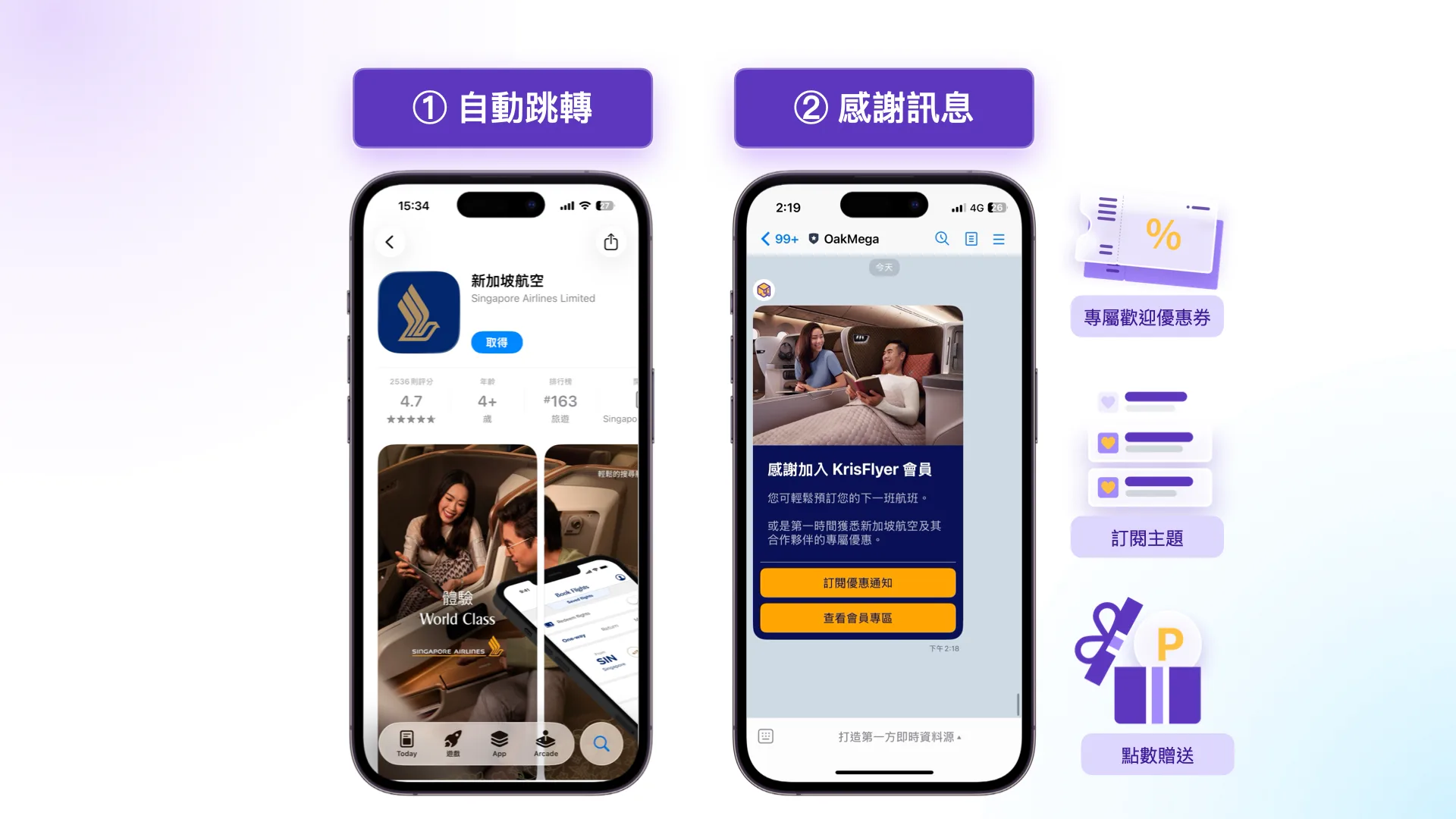
➀ Auto-redirect: After sign-up, users are sent to the app download page so conversion keeps flowing.
➁ Thank-you message: A thank-you message on LINE captures users at their most engaged moment.
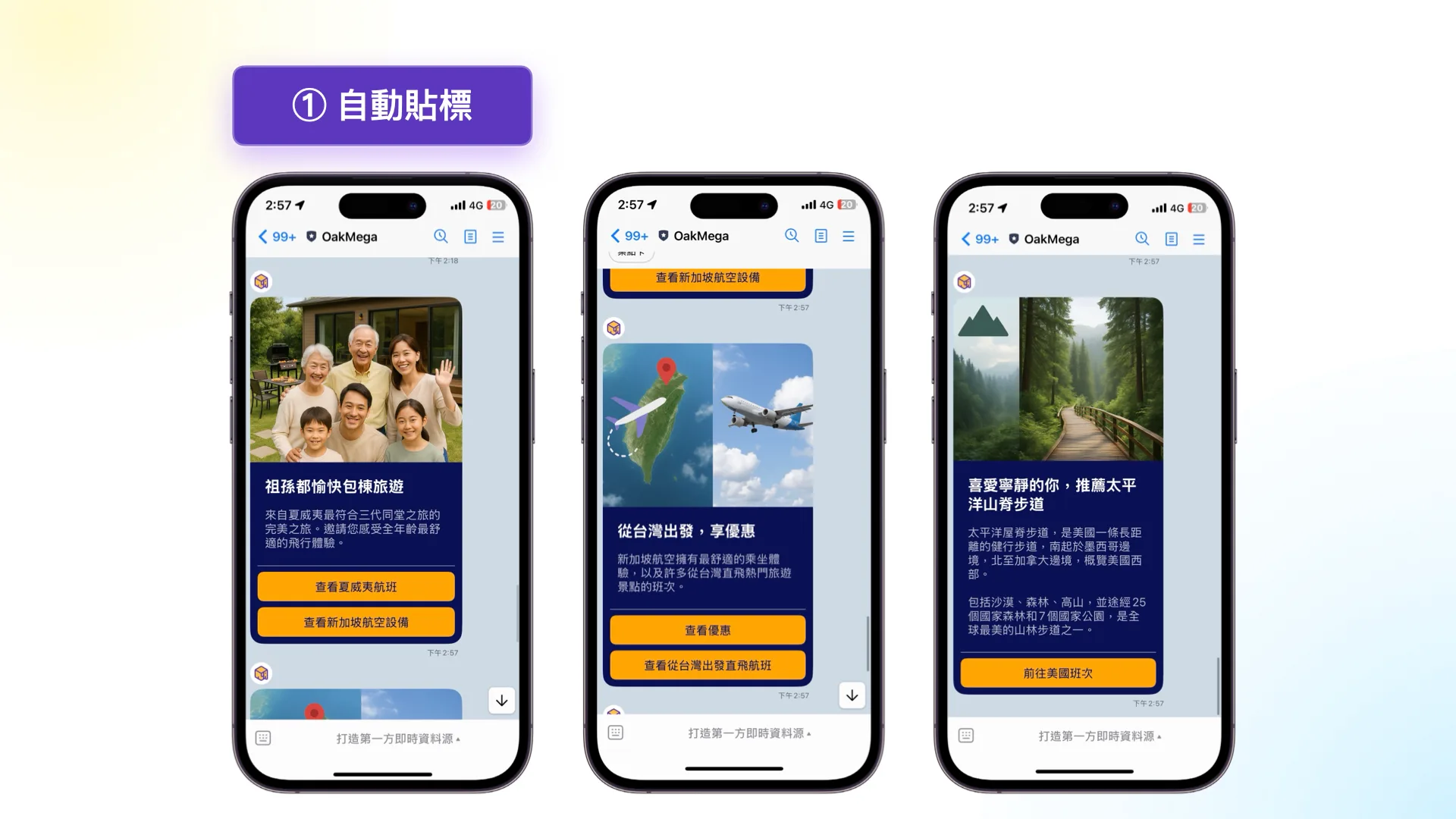
➂ Auto-tagging: Segment and push messages based on answers, for example, “three generations traveling together” → recommend whole-house rental trips.
⇩ Seminar Highlights | Experts Break Down Form Design and Automation
Event Registration: Digitize Four Stages for Security and Efficiency
From automotive and finance to healthcare, nearly every industry relies on events to create touchpoints. As events become more frequent, digitizing the process is now a must. It reduces manual errors, feeds data into your CRM in real time, and turns a single interaction into an asset you can keep nurturing.
Stage 1: Registration
Registration forms often involve lots of information and sensitive personal data, so a concise, compliant design is essential.
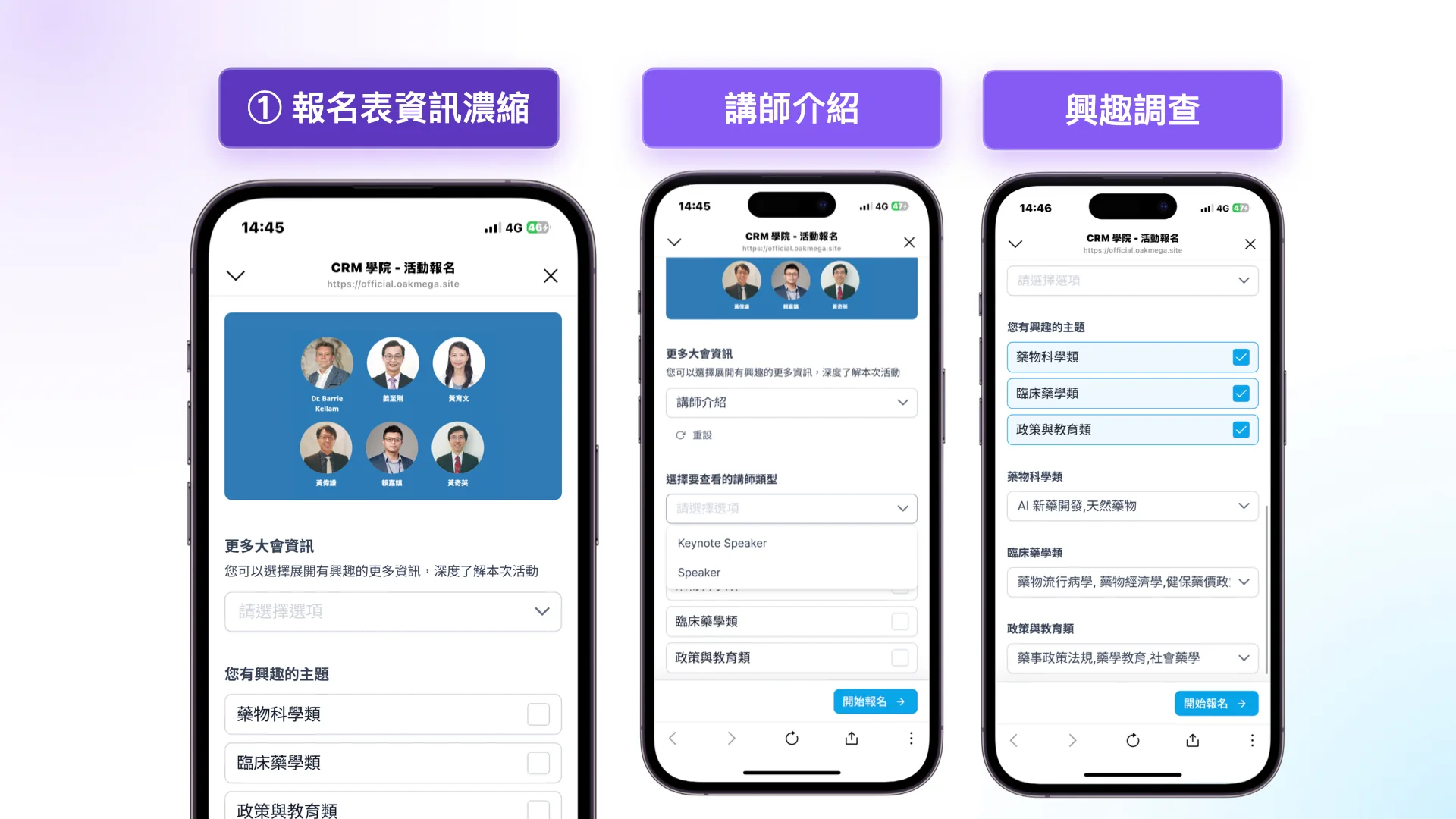
➀ Condensed registration information
Oversimplifying event details can also cause users to abandon the form. A more effective approach is to use “show/hide sections” so users choose what to read. The interest survey uses topic filters as well, collecting complete data while keeping the form clean.
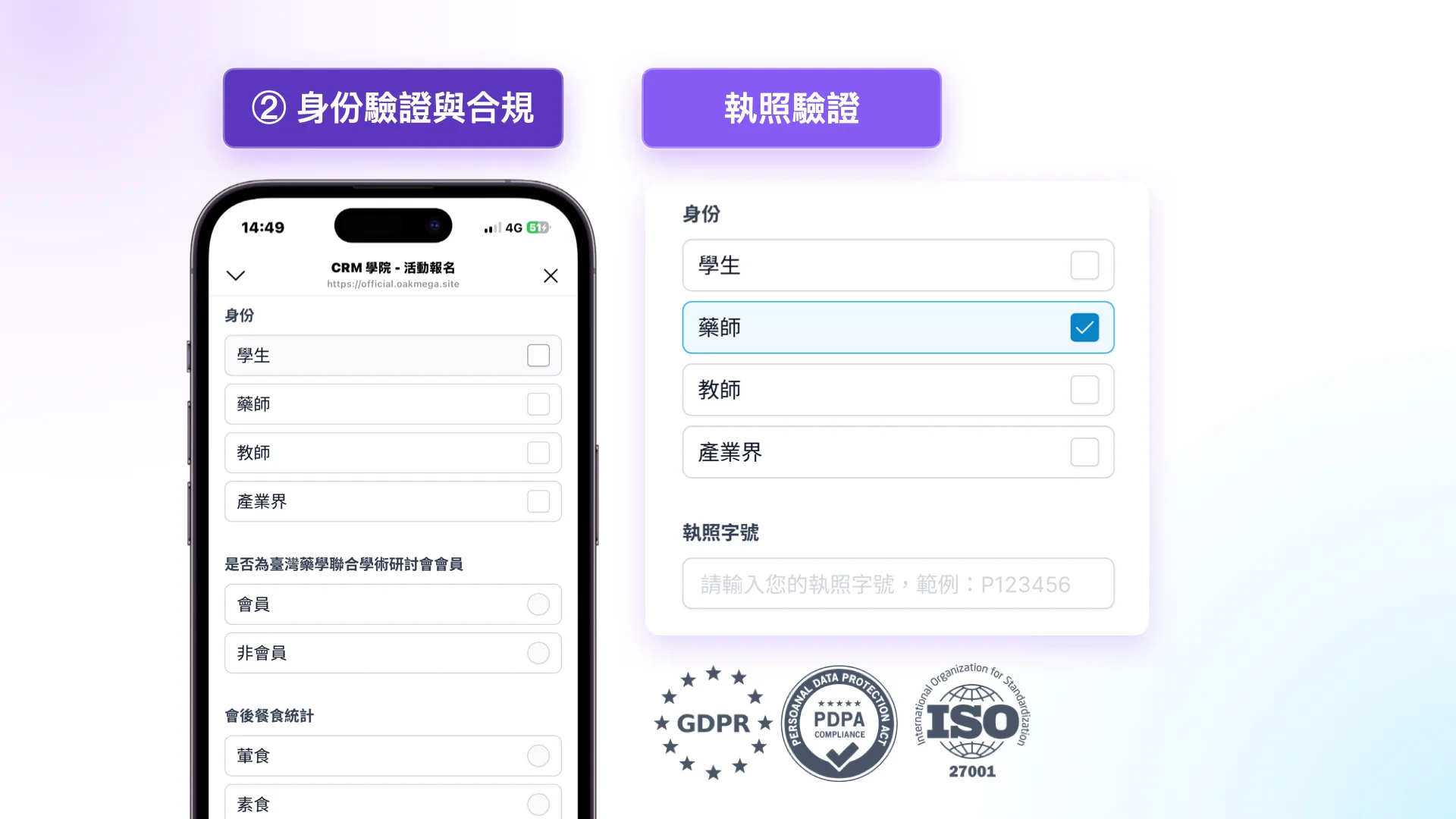
➁ Identity verification and compliance
For example, a pharmacist license number must start with “P” followed by digits; anything else can’t be submitted, keeping bad leads out. Enterprise forms must also take compliance and security seriously: all information is transmitted with TLS/SSL encryption, the tool should be ISO/IEC 27001 certified, include built-in consent and privacy terms, and honor the GDPR rights of access, rectification, and erasure. That’s how you keep data transparent and build trust.
Stage 2: Pre-Event Warm-Up
Enthusiasm cools fastest in the gap between registration and the event, so you need to stay top of mind.
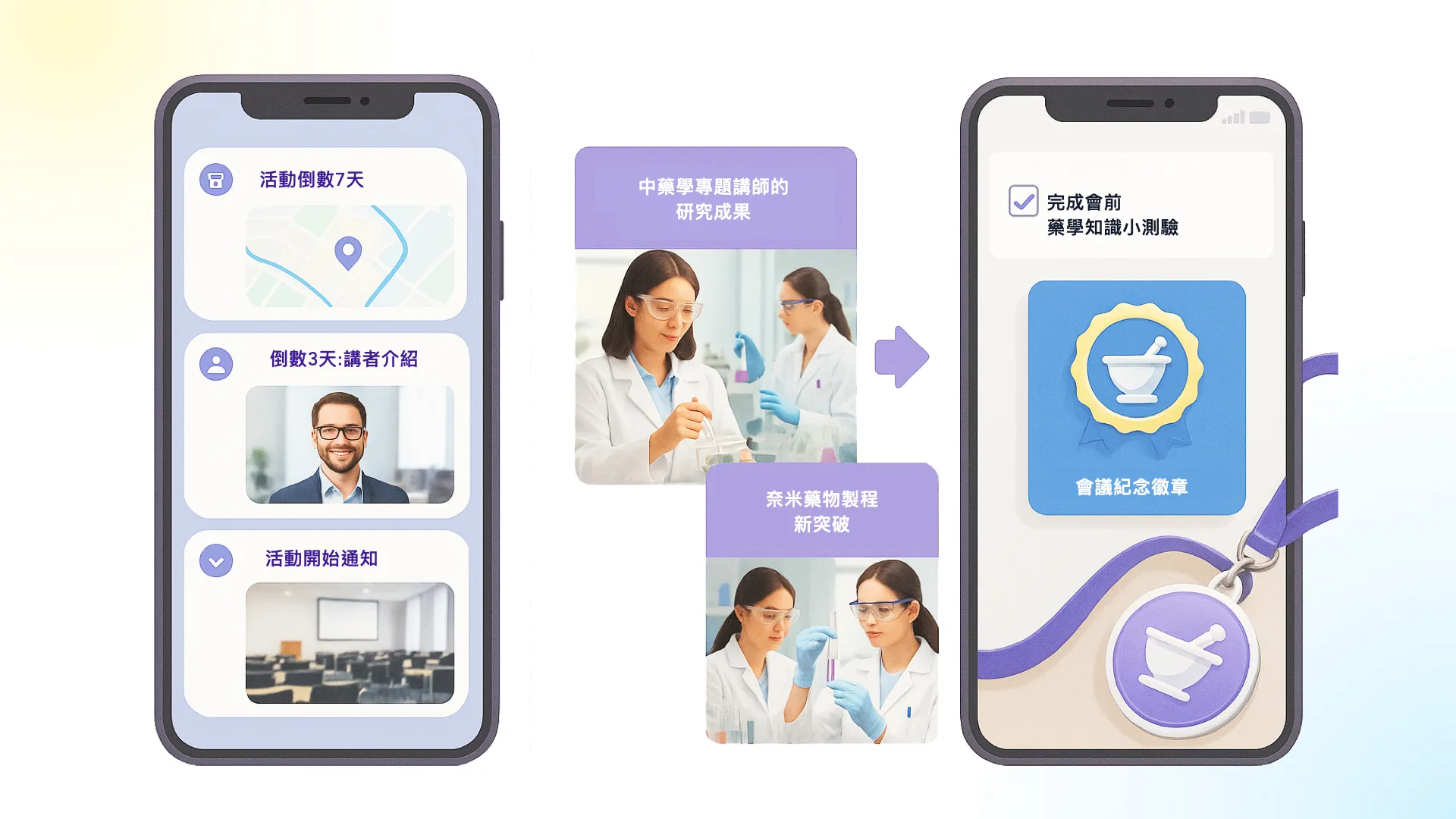
- Countdown reminders: Automated countdown messages prevent no-shows and drop-off.
- Content previews: Break the agenda into visual posts to build anticipation.
- Warm-up engagement: Quizzes or missions get attendees invested early.
Stage 3: On-Site
On event day, the key is keeping participants engaged while continuously capturing interaction data.
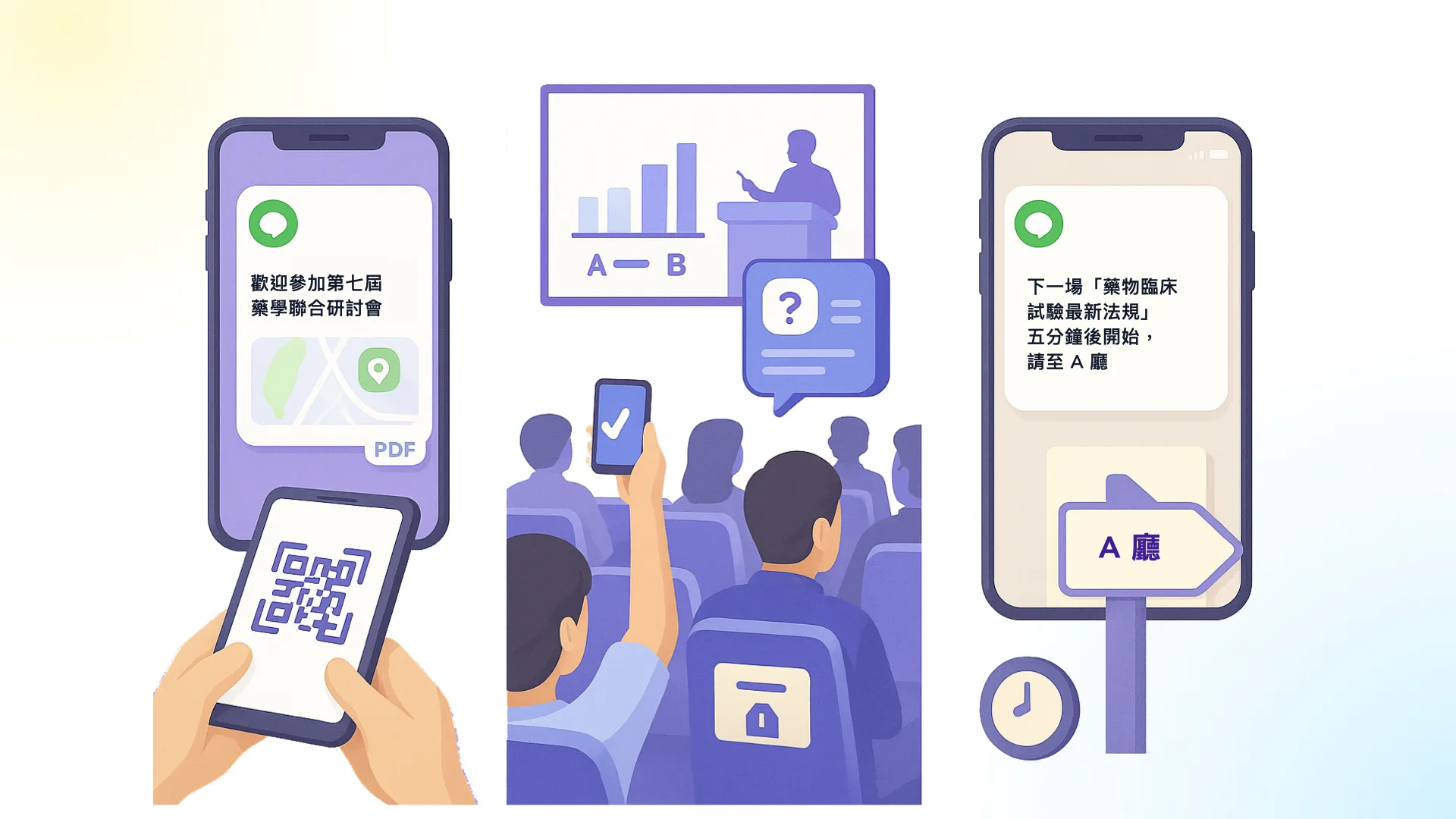
- Fast check-in: Scan a QR code to instantly get the map and handbook.
- Live interaction: Online polls or Q&A, with results shared on site in real time.
- Engagement tagging: Every interaction is automatically recorded in the CRM.
Stage 4: Post-Event Nurturing
Turn every interaction, role, and behavior into the basis for ongoing engagement.

- Thank-you recap: Send a message with slide and photo downloads.
- Interest-based segments: Automatically route attendees by session and send matching study notes.
- Role-based follow-up: Each role receives a tailored CTA to extend the relationship precisely.
⇩ Seminar Highlights | Walk Through the 4 Digitized Stages with Our Experts
👉 Download the OakMega Forms Deck
Customer Inquiries: Three Must-Have Techniques for CRM Forms
In high-ticket industries with complex decisions (such as automotive, aesthetic medicine, and B2B services), direct sales are difficult, so inquiry forms are a critical CRM touchpoint: start the conversation first, then move toward the deal.
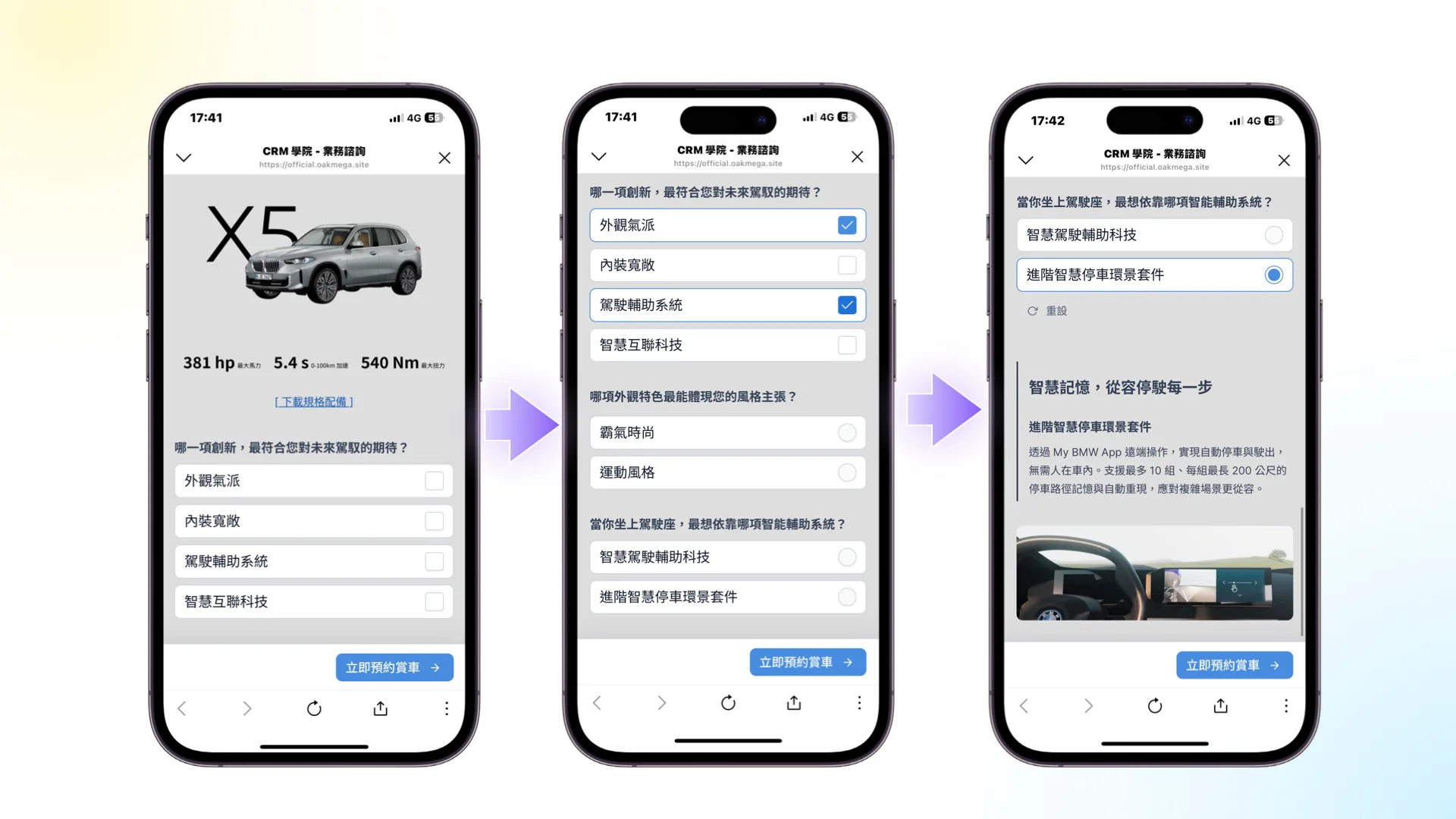
1. Guiding Questions: Pinpoint Needs by Asking
Asking “What would you most like to experience?” makes people more likely to act (the question-behavior effect). Combine that with Hick’s Law by showing only one question per screen for faster, effortless decisions. (Left)
2. Layered Choices: Commitment Boosts Completion
Small commitments lead to consistent follow-through (commitment and consistency). Have users make a first-level choice, then gradually reveal highlights to avoid information overload. Customers feel they are exploring on their own, which builds self-identification and moves them from interested to self-persuaded. (Center, right)
3. CRM Tags: From Answers to Precise Follow-Up
Once the form is submitted, the data flows into the CRM instantly, and the system automatically assigns or notifies the right sales rep. Reps can call right away, schedule a test drive, and send tailored content, so customers feel valued from the very first interaction.
⇩ Seminar Highlights | Build Forms with Purchase Intent Built In, Alongside Our Experts
Our CRM seminars often fill up fast. Click the link and add us on LINE to get notified so you never miss one!
👉 Subscribe to CRM College Seminars
Meet the Form Tool Born from Social CRM
The OakMega Forms team has served hundreds of leading companies and built up tens of thousands of hours of Social CRM implementation experience. We understand what brands need and remain committed to 100% in-house development to ensure quality, speed, and confidentiality. At this seminar, Head of Product Samuel also demonstrated how to build a form quickly with our no-code editor.
⇩ Seminar Highlights | Explore the No-Code Form Editor with Samuel
FAQ
We’ve gathered some frequently asked questions here. Expand any item for details:
- How is it different from common form tools (Google Forms, SurveyCake)?
OakMega Forms is a Social CRM–native form that integrates with your CRM in real time, directly triggering segmented messaging, marketing automation, and sales follow-up. It goes far beyond a simple data collection tool. - What are the most useful features?
- Tag settings: Automatically tag users when they open and when they complete a form, enabling precise segmentation.
- Submission limits: Set the submission period, total submissions, and per-person submissions, or even restrict the form to users with specific tags.
- Visual customization: Adjust thumbnails, page size, background, and button colors to match your brand design.
- Page management: Supports login, welcome, ineligible, and expired pages.
- Versatile editing: More than 10 editing features (H1–H5, lists, multimedia, and more).
- Member information: Fields include name, email, birthday, gender, phone, and location.
- Skip logic: Questions show or hide automatically based on answers, keeping pages shorter.
- How can I learn more?
Request the OakMega Forms Deck to see how forms connect with Social CRM in practice.
👉 Download the OakMega Forms Deck - What’s next for OakMega Forms?
- GTM tracking: Configure GTM (Google Tag Manager) for each form individually to support ad campaigns, retargeting, and behavioral heatmap analysis.
- Omnichannel login: Including LINE, Facebook, Google, email OTP, and phone number OTP.
- Deep CRM integration: Two-way sync with Social CRM custom fields, while also syncing responses to other CRMs or endpoints.