Advanced LINE Marketing Guide | Handle Customer Service Requests with LINE Forms on Your LINE Official Account
Running a LINE Official Account means fielding a constant stream of questions from your LINE friends. Faced with a flood of customer service messages, most teams reply one by one, worried they’ll miss something. Keyword auto-replies help, but it’s hard to get friends to type the exact keyword you set. Is there a better way to resolve their questions? Try a customer service form on LINE.
 Howard HuangMarketing Specialist
When you run a LINE Official Account, how often do your LINE friends message you with questions? Business hours, product sizes, booking cancellations — faced with a flood of customer service messages, most teams reply to each one by hand, worried they’ll miss something.
We all want to resolve our friends’ questions as best we can, raise their satisfaction with the brand, and bring them back to engage again. After all, the reason we invested in LINE as a channel was to reach friends directly through one-on-one messages.
Setting up keyword auto-replies is one solution: when the system receives a message that exactly matches a keyword, it replies automatically. The catch is that it’s hard to get friends to send the exact keyword you specified.
So is there a more effective way to handle your friends’ customer service questions? Try a customer service form on LINE.
How Can Auto-Response Messages Make Your Customer Service More Efficient?When you run an official account, replying to customers quickly matters for your brand. But business hours and staffing limits often force merchants to delay responses, leaving customers waiting hours — or even until the next business day — to hear back. Are you wondering whether there’s a better way to speed up your customer service workflow?https://oakmega.com/blog/improve-response-time
Build a Dedicated Customer Service Form for Your LINE Friends
You can place a link to an external form, such as Google Forms or SurveyCake, on a LINE rich menu button to serve as your customer service form. Or you can set up a customer service chatbot flow and include the form link there. When a friend taps it, the form opens directly in a browser via a LIFF app, so they can submit their request without leaving the chat.
But external forms have one big drawback: you have to export and clean up the form data regularly, then go back and match each response to a LINE friend before replying. Since you’ve chosen LINE as the place to engage your friends, wouldn’t it be easier to handle everything — filling out the request, organizing the data, and replying in real time — in one place on LINE? You’d resolve friends’ issues more effectively, keep their data in a single dashboard, and get a clearer picture of each friend’s behavior.
Give the OakMega Social CRM customer service form a try!
OakMega Customer Service Forms: Log and Respond to Friends’ Requests in Real Time
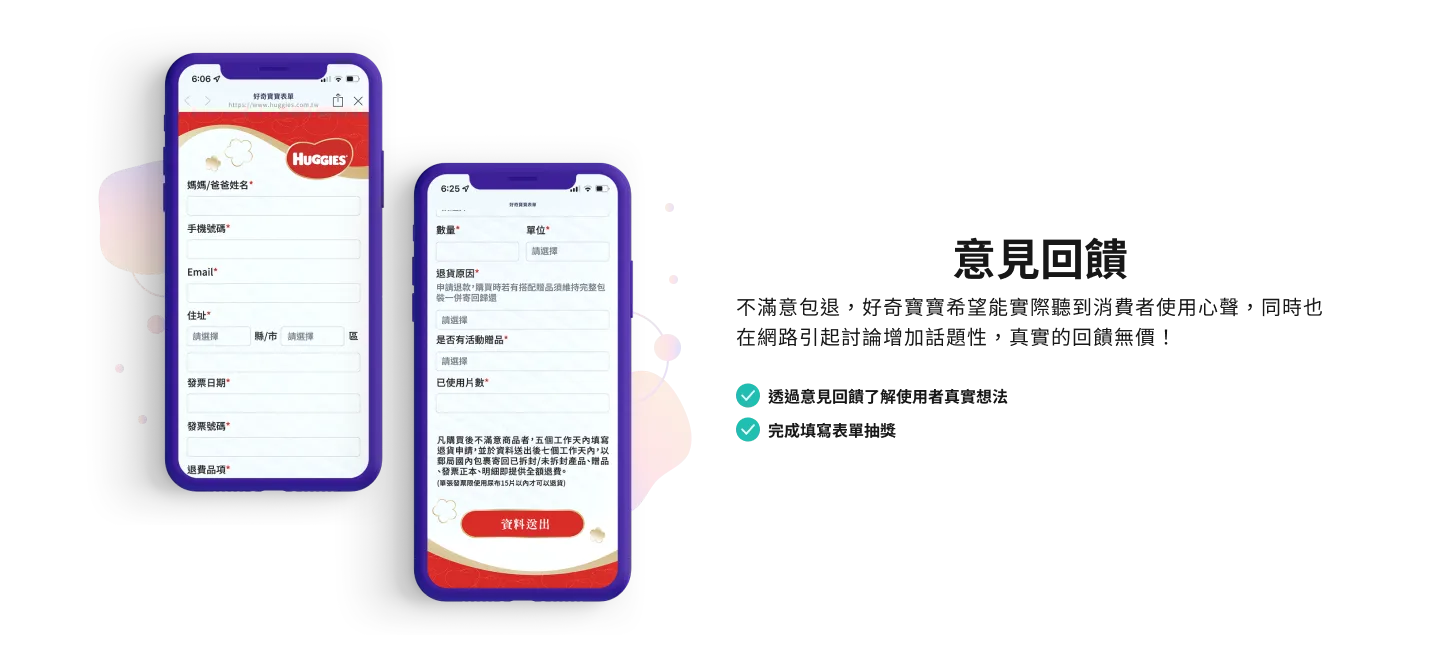 Huggies uses a form on its LINE Official Account so friends can share genuine feedback more quickly and easily
The OakMega Social CRM customer service form is one of OakMega’s three survey-type modules, built specifically to help brands resolve friends’ issues on LINE in real time. When a friend taps the form link, they fill out a pre-configured form step by step: their basic information, the problem they ran into, and how it’s currently being handled.
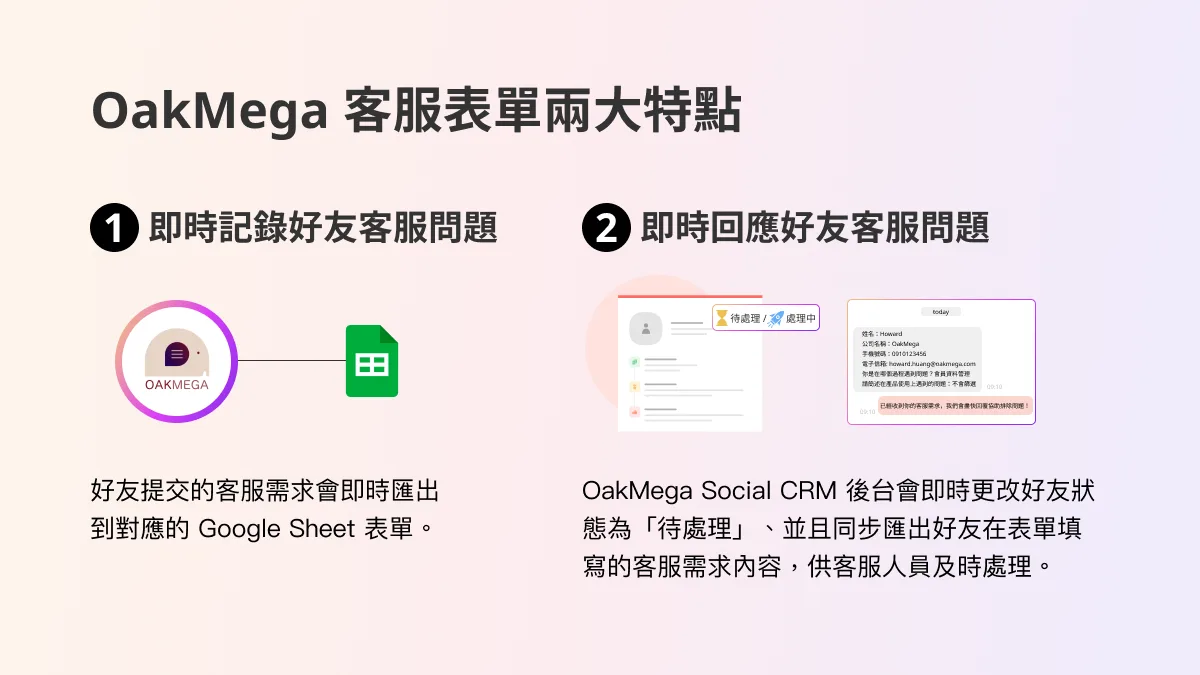
Two Key Features of OakMega Customer Service Forms
1. Log friends’ customer service requests in real time
Requests that friends submit through the form are exported instantly to a linked Google Sheet, so brand managers can review them at any time.
2. Respond to friends’ customer service requests in real time
Because customer service issues tend to be more urgent, the form goes beyond a standard survey: it automatically sets the friend’s status to “Pending” in the dashboard and instantly exports what they wrote in the form.
- The dashboard immediately changes the friend’s status to “Pending.” In one-on-one chat, you can also use the “All Service” and “In Progress” views to find friends who triggered a customer service request and handle them right away.
- The content of each request is also synced to the one-on-one chat window with that friend, so your support agents can act right away based on the “Pending” status and the request details shown.
Conclusion
Whatever channel you use to build your brand, you need to keep offering friends the right products and services and resolve their pain points quickly. On LINE, you can take advantage of the platform’s direct line to your friends to deliver a more complete customer service experience. For example, combine a chatbot flow with preset answers to common questions, then add a customer service form and live agents. This spreads out incoming requests, reduces busy lines, makes your support workflow more efficient, and ultimately builds friends’ satisfaction with and trust in your brand.
As an example, take the “LINE contact-tracing form” we made available to everyone during Taiwan’s Level 3 COVID-19 alert. It merges the form data LINE friends submit into your existing member records, and lets you push LINE messages and start conversations right away. Click the link to check out the form.
We’ve also put together a comprehensive LINE health-check white paper for brands this quarter. Use the included checklist to review how your official account is performing and make adjustments based on our recommendations. Click the info box below to learn more.
Want more LINE marketing tips? Wondering which form service best fits each use case? Visit the OakMega LINE Official Account for more LINE marketing content, or follow our “OakMega LINE Marketing Toolkit,” which walks you through building a brand LINE Official Account from scratch.